If you run a WooCommerce store with a blog attached, you already have two separate content types competing for a reader’s attention: articles that inform, and products that sell. Ariadne can recommend both, using the same scoring engine, without you writing a separate integration for either. Here’s exactly how that works, and what stays separate by default.
One toggle, not a separate plugin
Related Products for WooCommerce isn’t a bolt-on feature with its own settings screen. It’s the same matching engine Ariadne already uses for blog posts, applied to a second post type. Turn it on under Settings → General → Enabled post types by adding Products alongside the default of Posts. That’s the entire setup. This is a Pro and Pro+ feature (Free is Posts only), and nothing changes for your existing blog posts when you flip it on.
How the matching actually works for products
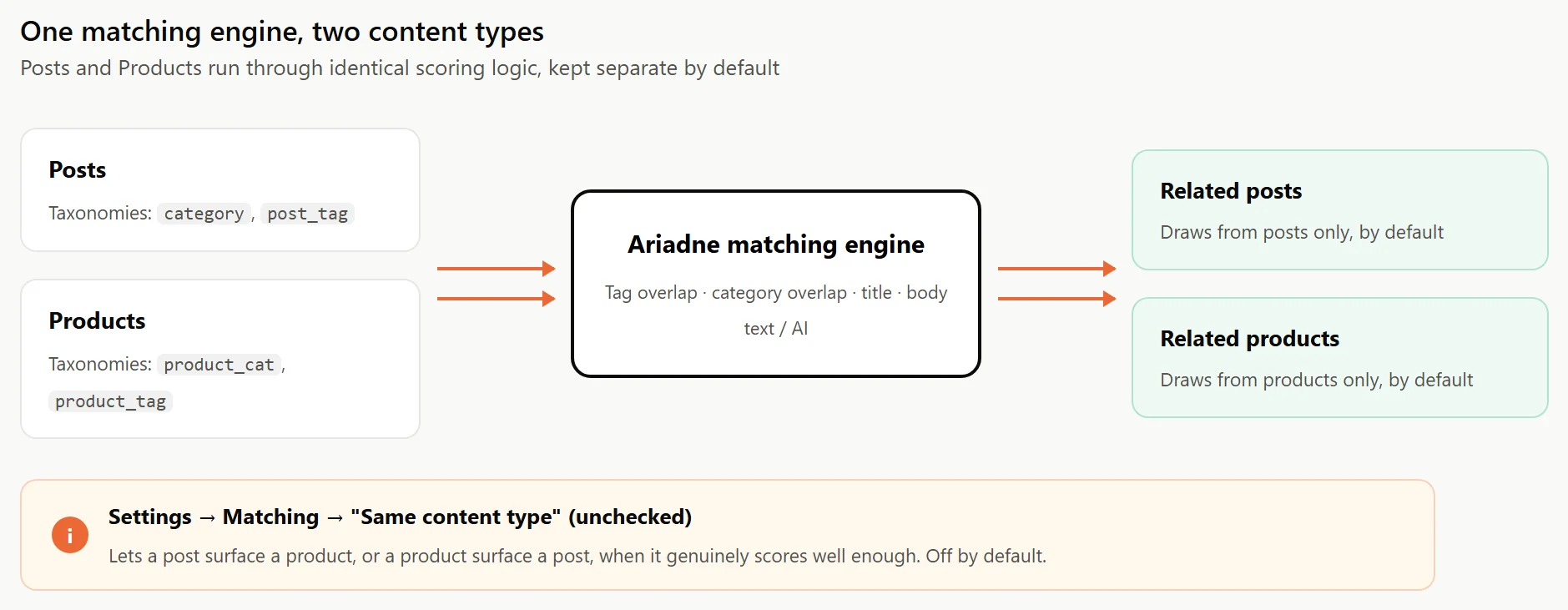
Ariadne doesn’t have a separate “WooCommerce mode” with its own scoring rules. It resolves WooCommerce’s own product_cat and product_tag taxonomies automatically as the category and tag signals for that content type, the same way it resolves a normal post’s category and post_tag. Title overlap, local text matching, and (on Pro/Pro+) semantic embeddings all apply identically. You’re not configuring a second system. You’re pointing the existing one at more content.
WooCommerce’s single-product template has one real wrinkle: it doesn’t route its product summary through the standard the_content filter the way a normal post template does, so a plugin that only hooks into the_content would never see a product page at all. Ariadne accounts for this with a dedicated woocommerce_after_single_product_summary hook that fires automatically once Products is enabled, placing the related-items block right after the summary. You don’t edit your product template to make this work.
Products and posts stay separate, by default
Turning on Products doesn’t mean your blog posts start recommending mugs and your product pages start recommending unrelated articles. Nothing changes for your existing posts when you enable Products: each post type’s related list only ever draws from other content of the same type by default, so a post’s related list has no way to surface a product, and a product’s related list has no way to surface a post, unless you tell it otherwise.
If you actually want cross-type recommendations, that’s a real, documented option: Settings → Matching has a “Same content type” checkbox that, when unchecked, lets a post surface a product (or a product surface a post) if it genuinely scores well enough on the other signals. Most stores leave it off, since a reader partway through an article and a shopper comparing two products usually want different things. But the option exists if your catalog and content are tightly related enough that mixing them makes sense.
Why this is worth setting up even on a small catalog
You don’t need Amazon-scale traffic for the underlying logic to hold: a shopper already looking at one product is a warmer lead for a related one than almost any other visitor on your site. They’ve already decided to buy something in that category, they’re already on a product page instead of bouncing off a blog post, and a related-products block is one of the cheapest ways to put a second, relevant option in front of them without any extra ad spend to get them there.
Styling is shared, not duplicated
Related products render through the same Customizer section as your regular Related Posts block, meaning the layout, colors, borders, and image settings you’ve already configured apply automatically. If you want products to look visually different from blog post recommendations, that’s a Custom CSS or theme-level adjustment, not a separate Ariadne settings panel to hunt down.
Before you flip the switch
A few minutes of prep make the results noticeably better on day one, rather than waiting for the background jobs to slowly catch up:
- Check that your product categories and tags are actually populated. A catalog where every product sits in one generic category will score the same way blog posts do when they’re under-tagged: technically working, but not distinguishing much between products.
- On a large catalog, expect the initial backfill to take a while, the same background jobs handling your blog posts now have your entire product catalog to work through too. It runs on its own schedule without slowing down your storefront in the meantime.
- Decide on “Same content type” before you get used to the default. Turning it off later is easy, but it does change what shows up on pages that have already been indexed under the stricter setting.
For the exact settings walkthrough, see our Related Products for WooCommerce documentation. If your store hasn’t touched multi-post-type support yet, it’s worth checking whether your product catalog is even tagged and categorized as specifically as your blog content, since the same tag-overlap math that drives blog post matching (see our piece on why tags matter more than categories) applies just as much to products.