Automatic scoring gets a related list right most of the time, but “most of the time” isn’t the same as “every time.” Ariadne gives you three ways to step in when the algorithm needs a human decision: pinning a post that should show up regardless of score, excluding one that never should, and Cornerstone Posts for the handful of articles you want surfacing sitewide. All three are Pro and Pro+ features, and all three live in the same meta box on the post-edit screen.
Start by seeing what Ariadne already picked, and why
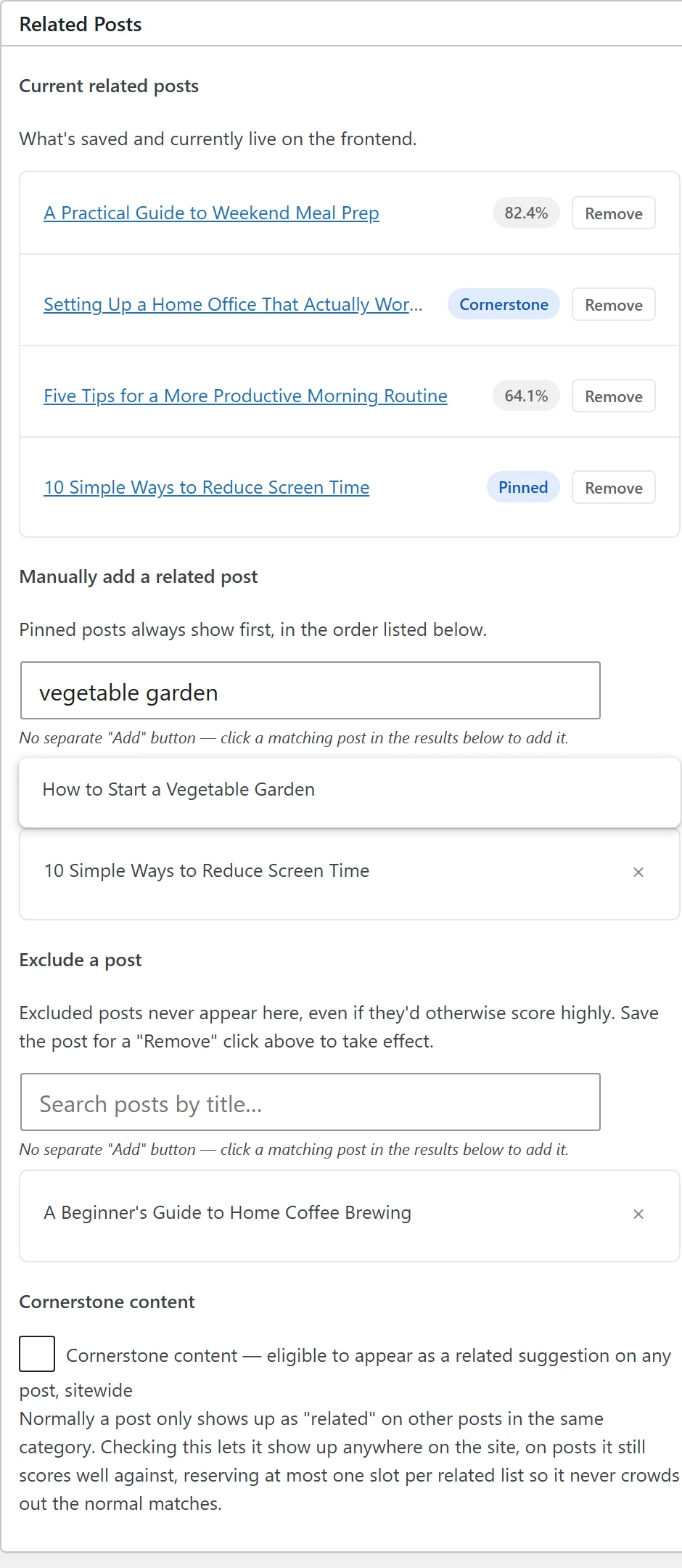
Before overriding anything, the meta box on any post’s edit screen already shows you the current auto-computed related list, along with each match’s score. That matters more than it sounds like: you’re not guessing whether the algorithm got something wrong, you’re looking at the actual scored output and deciding whether it needs a human correction. Most of the time it won’t. When it does, the fix is usually one of the next two tools, not a full weight change in Settings.
Pinning: guarantee a post shows up
The “pin a post” search in the meta box forces a specific post into this post’s related list, regardless of what it scores. This is the tool for cross-promoting something the algorithm has no way to know matters right now: a related product launch, a cornerstone article you want more traffic on, or a follow-up piece that’s thematically close but doesn’t share enough tags or vocabulary to score well on its own. A pin overrides scoring entirely for that one slot, which makes it a guarantee rather than a scoring boost.
Excluding: guarantee a post doesn’t
The “exclude a post” search does the opposite: a post you never want suggested here, even if it would otherwise score well. The docs list two common reasons this comes up. One is an outdated article you’re phasing out but haven’t unpublished yet, still technically well-tagged and still capable of scoring high. The other is two posts that are honestly similar in content but shouldn’t be cross-linked for editorial reasons, maybe they cover competing products, or a sensitive topic you don’t want algorithmically paired with something unrelated in tone. Both pins and exclusions are stored per source post, so excluding post B from post A’s related list doesn’t touch what shows up on post B’s own page.
Cornerstone Posts: broad, not per-post
Pinning and excluding both work one relationship at a time: this post, that post. Cornerstone Posts work differently. Flagging a post as a Cornerstone Post, a checkbox on that post’s own edit screen, makes it eligible to appear as a related suggestion on any post sitewide, not just ones sharing its category or tags. This is the tool for a definitive guide or pillar article you want surfaced broadly, not a specific one-to-one relationship you’re managing by hand.
The design deliberately limits the blast radius: at most one slot per related list is reserved for a Cornerstone match, so a Cornerstone Post never crowds out the rest of the properly-scored matches sitting alongside it. You get guaranteed visibility for your most important content without turning every related list on the site into a rotation of the same three pillar articles. Cornerstone posts also get their own sortable column on your Posts list for finding them later, and a “Featured” badge on the actual frontend card so readers can tell it was deliberately surfaced, not just the highest scorer.
A practical guardrail worth setting for yourself, even though Ariadne doesn’t enforce one: keep the actual Cornerstone list short, somewhere in the low single digits for most sites. The one-slot-per-list cap already prevents any single post from crowding out every other match, but if you flag twenty posts as Cornerstone, you’ve mostly recreated a rotation instead of a curated set of pillar content, and diluted the point of having the designation at all.
Which tool for which job
Use pinning when the relationship is specific: this post should always link to that one, for a reason the algorithm can’t see. Use excluding when a pairing is technically accurate but wrong for editorial reasons. Use Cornerstone Posts when you have a small number of genuinely foundational articles that deserve broad visibility across the site, not just within their own category or tag cluster. None of the three touch your actual scoring weights, so they layer cleanly on top of whatever automatic matching is already doing.
See the full pinning, excluding, and Cornerstone Posts documentation for where to find each control on the edit screen.