Most related-posts plugins treat “category” as the whole story: pick a category, get posts from that category, done. Ariadne uses categories too, but if you only set categories and skip tags, you’re leaving the single biggest signal in the scoring formula turned off. Here’s how the two actually differ, and why it works out that way.
Two different jobs: getting into the pool, and winning the pool
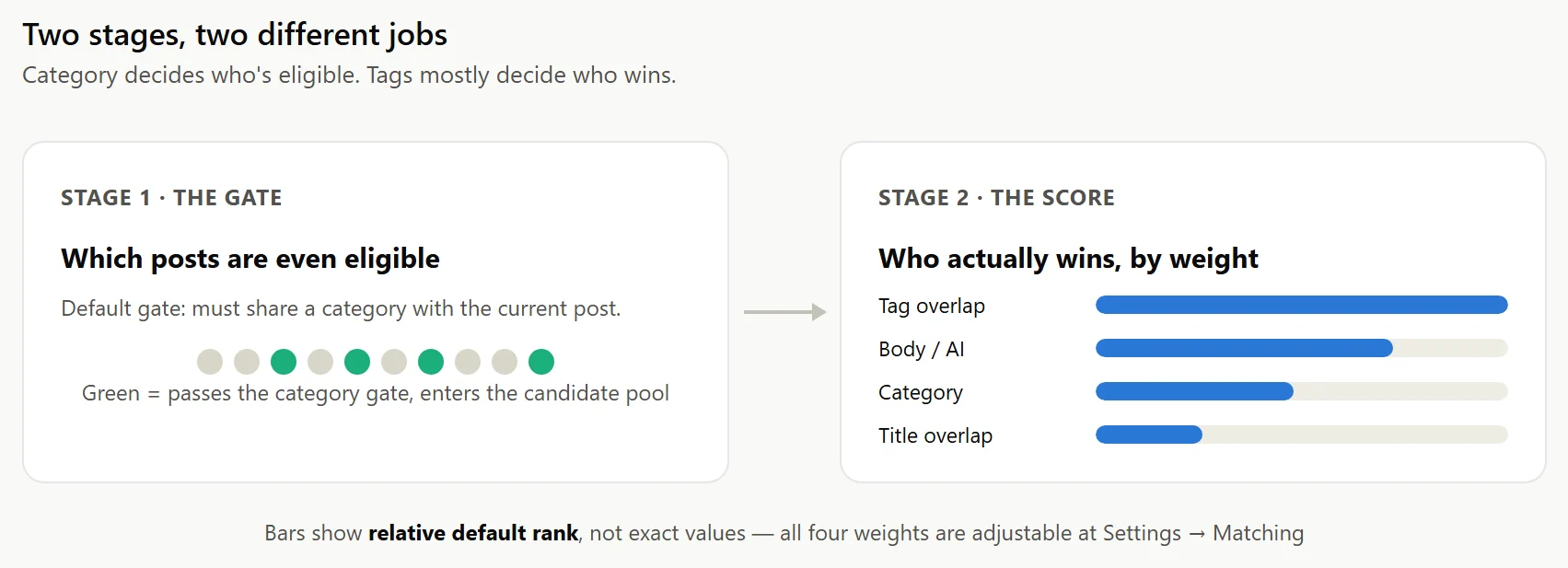
Ariadne’s matching runs in two stages, and it’s easy to blur them together because both involve categories. The first stage is the candidate gate: before any scoring happens, the plugin decides which posts are even eligible to be compared against the one you’re reading. By default, that gate is category only: a post has to share a category with the current post just to be considered.
The second stage is scoring. Once a pool of candidates exists, four signals compete to rank them: tag overlap, title overlap, body text (a blend of local keyword matching and, on Pro, AI semantic similarity), and category overlap again, this time as a genuine scoring input rather than a gate. By default, tag overlap carries more weight than any of the other three.
So category decides who’s allowed to compete. Tags mostly decide who wins.
Why tags outscore categories once they’re both in play
Categories aren’t unimportant. They’re just too broad to discriminate much once you’re already comparing posts that share one. Most sites run somewhere between five and twenty categories, each covering a wide swath of content. Say your site has a “Guides” category with 200 posts in it. Sharing that category with another post tells the scoring formula almost nothing about which of those 200 posts is actually the relevant one.
Tags don’t have that problem, because there are usually a lot more of them and they’re applied more specifically. A post tagged “voyage-ai”, “embeddings”, and “api-pricing” is describing itself in a way a single “Guides” category never could. Ariadne’s tag-overlap score is a capped, diminishing-returns calculation: sharing one tag with another post contributes a small amount, sharing three contributes noticeably more, and sharing five or more tops out the signal, since beyond that point more shared tags stop meaningfully distinguishing one candidate from another. Category overlap uses the same capped-overlap idea, but because most posts on most sites only carry one or two categories at all, compared to several tags, there’s usually a much smaller range of real values for it to work with.
| Signal | Weight, default settings |
|---|---|
| Tag overlap | Heaviest |
| Body (text + AI on Pro) | Second |
| Category overlap | Third |
| Title overlap | Lightest |
All four weights are adjustable per site at Settings → Matching.
What this looks like on posts that only carry categories
If every post on your site has a category and nothing else, Ariadne still works: the category gate still filters candidates, and category overlap still contributes to the score. Title overlap and body text pick up the rest. But you’re running with one of your four signals switched off, on the exact one carrying the most weight. Two posts about completely different things can still tie on category and beat a post that’s actually closer in subject but sits in a different category bucket.
The fix isn’t complicated: tag posts the way you’d tag them if a person were trying to find related reading, not the way you’d file them into three or four broad sections. A handful of specific tags per post is enough to give the tag-overlap signal something real to work with.
A practical target: three to five tags per post, each one specific enough that it would only reasonably apply to a handful of other articles on your site. A tag like “wordpress” applied to every post is functionally the same as no tag at all, since it never distinguishes one candidate from another. A tag like “voyage-ai-pricing” or “cornerstone-posts” does real work, because sharing it actually means something. If you’re retagging an older archive, you don’t need to do it all at once: Ariadne recomputes a post’s related list automatically the next time you save it, so tagging can happen gradually, post by post, without a separate migration step.
How this compares to plugins that gate on category and stop there
In our comparison of related-posts plugins, YARPP’s own matching runs on weighted tags, categories, and text similarity, not category alone, which puts it closer to Ariadne’s approach than a pure category filter. But plenty of related-posts setups, including the simplest custom queries built directly on WP_Query‘s category__in, treat category as both the gate and the entire ranking logic. Same category, it shows up. Different category, it doesn’t. Nothing inside that pool gets ranked against anything else, so a strong match and a weak one look identical as long as both happen to share a category.
Ariadne’s gate is also configurable, not fixed. Settings → Matching lets you turn the category gate off, turn a tag gate on instead (OR’d with category if both are on), or open the pool to every published post with no gate at all, relying on the cap and background scoring to keep things fast. But regardless of which gate you choose, the scoring stage behind it is where tags do the real work of telling two same-category posts apart.
If you’re setting Ariadne up for the first time, a good rule of thumb: spend more time on tags than categories. Categories organize your site for readers browsing by section. Tags are what Ariadne actually uses to figure out what a specific post is about.