You don’t need a plugin to show related posts. A single function in your theme can do it. Here’s real, working code for three different ways to build it, what each one actually costs you, and the point where writing your own stops being worth it.
The basic idea
A related-posts function does one thing: it runs a second WP_Query after the main post loads, asking WordPress for other posts that share something with the one a reader is looking at. That “something” is usually a tag, a category, or both. You loop over the results the same way you’d loop over any other query, and print a title, a thumbnail, and a link.
That’s the whole idea. The differences between approaches come down to what you match on, and how much thought goes into the parts nobody notices until they break: what happens when there’s nothing to show, and what happens when the same query runs on every single page load.
Three real approaches, and what each one gets right
These aren’t hypothetical. They’re patterns pulled from actual WordPress tutorials, adapted here into one consistent style.
1. Match by tag
function uwawp_related_by_tag( $post_id, $count = 4 ) {
	$tags = wp_get_post_tags( $post_id, array( 'fields' => 'ids' ) );

	if ( empty( $tags ) ) {
		return new WP_Query(); // No tags, no related posts. See below.
	}

	return new WP_Query( array(
		'tag__in'        => $tags,
		'post__not_in'   => array( $post_id ),
		'posts_per_page' => $count,
		'no_found_rows'  => true,
		'ignore_sticky_posts' => true,
	) );
}
Simple, and it works well if your posts are tagged consistently. It has one obvious failure mode: a post with no tags gets zero related posts, every time. More on that in a minute.
2. Match by category
function uwawp_related_by_category( $post_id, $count = 4 ) {
	$cats = wp_get_post_categories( $post_id );

	return new WP_Query( array(
		'category__in'   => $cats,
		'post__not_in'   => array( $post_id ),
		'posts_per_page' => $count,
		'no_found_rows'  => true,
	) );
}
Almost every post has a category, so this rarely comes back empty. The tradeoff is precision. If your “Guides” category has 200 posts in it, sharing that category tells this query almost nothing about which of those 200 is actually relevant.
3. Match by tag or category, taxonomy-agnostic
function uwawp_related_posts( $post_id, $count = 4 ) {
	$tax_query = array( 'relation' => 'OR' );

	foreach ( get_object_taxonomies( get_post_type( $post_id ) ) as $taxonomy ) {
		$terms = wp_get_post_terms( $post_id, $taxonomy, array( 'fields' => 'slugs' ) );
		if ( ! empty( $terms ) ) {
			$tax_query[] = array(
				'taxonomy' => $taxonomy,
				'field'    => 'slug',
				'terms'    => $terms,
			);
		}
	}

	if ( count( $tax_query ) === 1 ) {
		return new WP_Query(); // No terms on any taxonomy at all.
	}

	return new WP_Query( array(
		'post_type'      => get_post_type( $post_id ),
		'post__not_in'   => array( $post_id ),
		'posts_per_page' => $count,
		'no_found_rows'  => true,
		'tax_query'      => $tax_query,
	) );
}
This is the most reusable of the three. It checks every taxonomy a post type actually has, not just tags or just categories, and it’s written as a function you can drop into any theme and call from anywhere. It’s the closest of the three to something you’d actually want to maintain long term.
| Approach | Comes back empty when… | Precision |
|---|---|---|
| Tag only | Post has no tags | Good, if tagging is consistent |
| Category only | Rarely | Weak on sites with few, broad categories |
| Tag or category | Post has neither | Best of the three, still just overlap, no ranking |
A fourth version, with caching actually done right
None of the three functions above cache anything, which means every single one runs a fresh database query on every page load. If you want to fix that, here’s the version that does, built on the taxonomy-agnostic function above:
function uwawp_related_posts_cached( $post_id, $count = 4 ) {
	$cache_key = 'uwawp_related_' . $post_id;
	$post_ids  = get_transient( $cache_key );

	if ( false === $post_ids ) {
		$related  = uwawp_related_posts( $post_id, $count );
		$post_ids = wp_list_pluck( $related->posts, 'ID' );
		set_transient( $cache_key, $post_ids, DAY_IN_SECONDS );
	}

	if ( empty( $post_ids ) ) {
		return new WP_Query();
	}

	return new WP_Query( array(
		'post__in'       => $post_ids,
		'orderby'        => 'post__in',
		'posts_per_page' => $count,
		'no_found_rows'  => true,
	) );
}

function uwawp_clear_related_cache( $post_id ) {
	delete_transient( 'uwawp_related_' . $post_id );
}
add_action( 'save_post', 'uwawp_clear_related_cache' );
The detail that actually matters here: the transient stores an array of post IDs, a handful of integers, not the WP_Query object itself. Caching the object doesn’t save you anything, because rebuilding it from the cache still has to hit the database to turn those results back into real posts. Caching the IDs means the expensive part, deciding which posts are related, only runs once a day per post, and the final query that actually fetches them stays fast either way. The save_post hook clears a post’s own cached list when it’s edited, so a retagged post doesn’t keep showing its old related list for the rest of the day.
Where this goes in your template
Call whichever function you picked from single.php, after the main loop, inside a check for whether it actually returned anything:
<?php
$related = uwawp_related_posts( get_the_ID() );
if ( $related->have_posts() ) :
	?>
	<h2>Related posts</h2>
	<ul>
		<?php while ( $related->have_posts() ) : $related->the_post(); ?>
			<li><a href="<?php the_permalink(); ?>"><?php the_title(); ?></a></li>
		<?php endwhile; ?>
	</ul>
	<?php
	wp_reset_postdata();
endif;
?>
That if ( $related->have_posts() ) check matters more than it looks like it should. A real, published tutorial on this exact topic skips it and just prints the heading and the loop unconditionally, which means a tagless post gets a “Related posts” heading sitting over an empty list. Always check first.
Adding a thumbnail, and enough CSS to not look bare
A plain list of text links works, but a thumbnail gives a reader something to actually look at before deciding whether to click. Swap the markup above for this, with a class added to the <ul> itself so the CSS below has something to hook into:
<h2>Related posts</h2>
<ul class="uwawp-related-list">
	<?php while ( $related->have_posts() ) : $related->the_post(); ?>
		<li class="uwawp-related-item">
			<a href="<?php the_permalink(); ?>">
				<?php if ( has_post_thumbnail() ) : ?>
					<?php the_post_thumbnail( 'thumbnail' ); ?>
				<?php endif; ?>
				<span><?php the_title(); ?></span>
			</a>
		</li>
	<?php endwhile; ?>
</ul>
And the CSS that turns that into an actual row of cards instead of a bare bulleted list, in your theme’s stylesheet:
.uwawp-related-list { display: flex; flex-wrap: wrap; gap: 20px; list-style: none; margin: 0; padding: 0; }
.uwawp-related-item { flex: 1 1 calc(25% - 20px); min-width: 160px; background: #fff; border: 1px solid #e5e5e5; border-radius: 10px; overflow: hidden; transition: box-shadow 0.2s ease, transform 0.2s ease; }
.uwawp-related-item:hover { box-shadow: 0 8px 20px rgba(0,0,0,0.09); transform: translateY(-3px); }
.uwawp-related-item a { display: block; text-decoration: none; color: inherit; }
.uwawp-related-item img { width: 100%; height: 120px; object-fit: cover; display: block; }
.uwawp-related-item span { display: block; padding: 12px 14px 16px; font-weight: 600; font-size: 14.5px; line-height: 1.4; }

@media (max-width: 600px) {
	.uwawp-related-item { flex: 1 1 100%; }
}
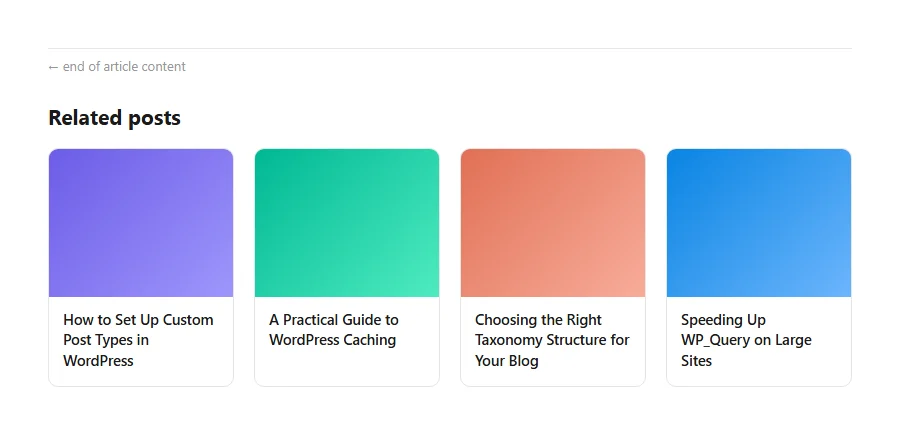
Here’s what that actually renders as. Four real cards in a row on a normal screen width, each one clickable end to end, not a text link with an image floating above it:
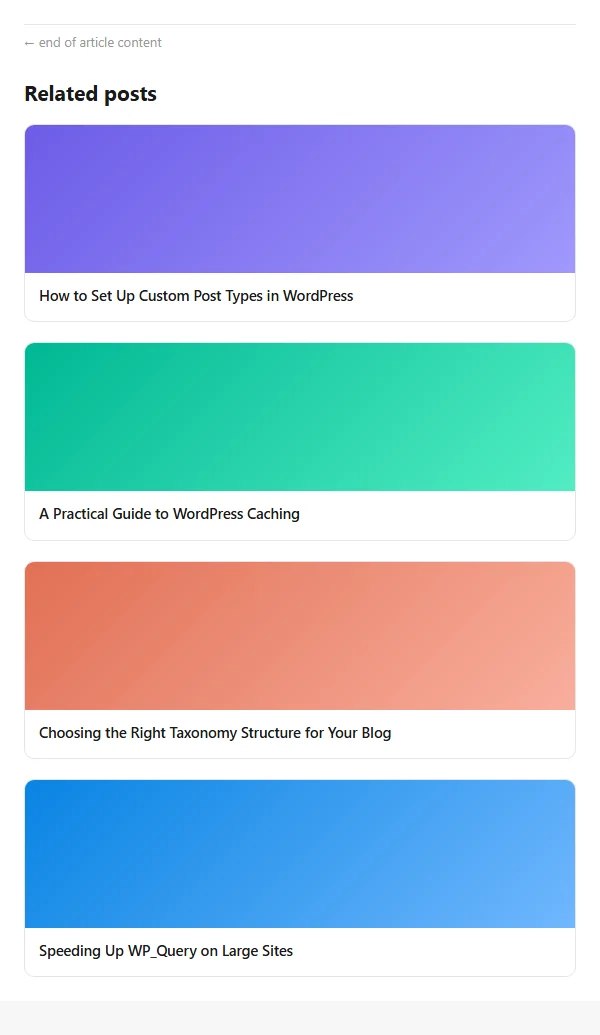
And on a narrow screen, the same markup and the same CSS, just one extra media query rule, drops to a single stacked column instead of squeezing four cards into a phone-width row:
Two details worth knowing. object-fit: cover on the thumbnail keeps every card the same height even when a featured image has a different aspect ratio, instead of one oddly cropped image throwing off the whole row. And flex-wrap plus gap replaces the older inline-block-and-percentage-width trick, which breaks in small but annoying ways: stray whitespace between inline-block elements quietly eats into the row width, and four items at exactly 23% plus 1% margins stops adding up cleanly the moment you change the count or the gutter.
That’s genuinely enough to not look unfinished. It won’t match your theme’s actual design system, but a related-posts row with real thumbnails and readable titles looks like a deliberate feature, where the bare text-link version can look like something that was left half-built.
What this costs you, honestly
None of this is free, and it’s worth being straight about what you’re taking on.
It runs on every page load. Every time someone visits a post, this query runs again, right then, on that request. A published tutorial covering this exact tag-based pattern caps it at five related posts on purpose, and says why outright: pulling more “can take a high volume of computing resources on your web server.” Nobody in the tutorials we looked at adds real caching. If you want it, you have to build it yourself, and it’s easy to get wrong: caching the whole WP_Query object in a transient doesn’t save you anything, because the object still has to touch the database to rehydrate on the next page load. What actually helps is caching the array of matched post IDs, not the query.
A tag-only query can come back completely empty. The same tag-based tutorial says it plainly: “if your post lacks any tag, nothing will be displayed as related posts, which makes perfect sense.” That’s not a bug in the code, it’s just what tag-only matching does with an untagged post. If your archive has any older, untagged posts, either backfill tags or use the taxonomy-agnostic version above.
It’s overlap, not relevance. Every one of these approaches answers one question: do these two posts share a term? None of them ask how closely related the posts actually are once they share one. Two posts that are both tagged “wordpress” and nothing else look exactly as related to this code as two posts that share five specific, on-topic tags. There’s no scoring, no ranking, no sense of “more” or “less” related, just in or out.
There’s no admin screen. Changing how results are ordered, swapping in random order instead of newest-first, adding an image or an excerpt: every one of those is a code change, not a settings toggle. Compare that to a theme with a related-posts feature built into the Customizer, where the same changes are a dropdown and a save button. Hand-written code gives you exact control over the markup. It gives up everything else.
It has to live somewhere that survives an update. If this goes into your active theme’s functions.php and that theme ever gets replaced or majorly updated, the function disappears with it. A child theme, or a small site-specific plugin, is the only way to make sure it’s still there in six months.
When to stop writing your own
None of this makes the manual approach a bad idea. For a small site with consistent tagging and no interest in styling options, a function like the third one above is genuinely enough, and it costs nothing to run.
It stops being enough once you want any of the things it structurally can’t do: matching on more than shared terms, an admin screen to pin or exclude a specific post, caching that actually works without you building it, or a fallback that does something smarter than showing nothing. That’s the point where installing something built for this, Ariadne or otherwise, starts saving you more time than it costs.