Most related-posts plugins give you exactly one placement decision: on or off, always at the bottom of the post. Ariadne treats placement as its own real setting, with a specific reason behind each option, because where a recommendation appears changes whether anyone actually sees it. Here’s what each placement option actually does, and when it’s worth reaching past the default.
The default: after the content, and why that’s a reasonable place to start
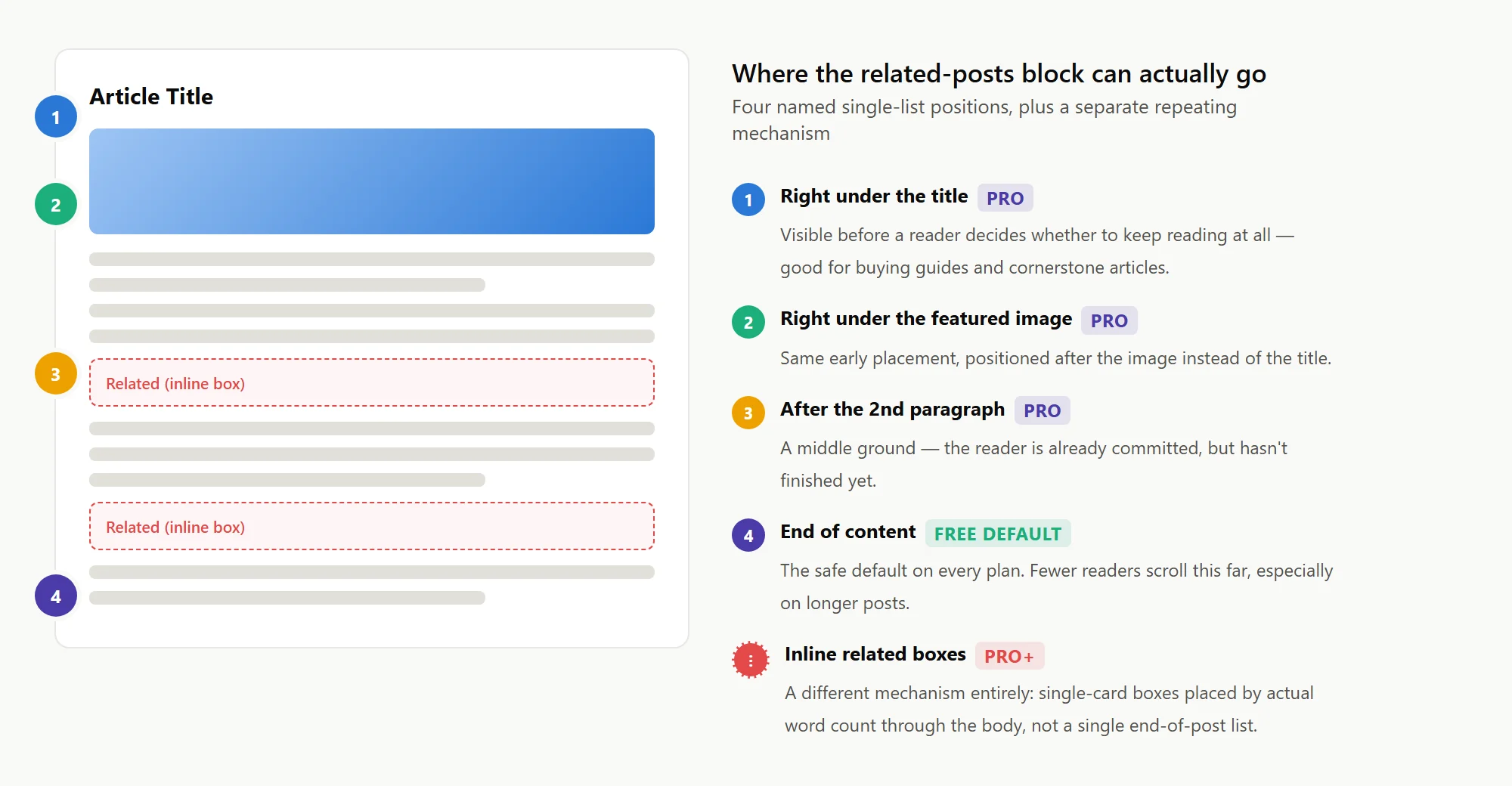
Out of the box, Ariadne’s related-posts block appears after your content, on every plan including Free. It’s the least intrusive option and the safest default for a plugin that has no idea yet what your theme or your readers look like. If you’ve never touched this setting, this is where your related posts already are.
The problem with “always at the bottom” isn’t that it’s wrong. It’s that fewer readers ever scroll that far, especially on longer content, and a recommendation nobody scrolls to is a recommendation that does nothing.
Named presets: choosing a better spot without hand-editing templates
Pro and Pro+ unlock a handful of named position presets under Settings → General: right under the title, right under the featured image, after the 2nd paragraph, or the end-of-content default. If none of those fit, you can specify an exact paragraph number instead, including a negative number to count backward from the end of the post rather than the start. None of this requires touching your theme’s template files. It’s a setting, not a code change.
Right under the title or featured image works well for high-intent content, a buying guide or a cornerstone article where you want the related list visible before someone decides whether to keep reading at all. After the 2nd paragraph is a middle ground: the reader’s already committed to the article, but hasn’t finished it yet.
The theme ad-slot problem, and why it’s a real setting and not an edge case
Some themes render extra content, typically an ad unit, immediately after the main article using their own placement hook rather than the standard content area. If Related Posts is set to appear at the end of content, appending it the normal way puts it before that ad content, since the two aren’t rendered on the same pass. Ariadne’s “Position vs. theme ad slots” setting, on by default, automatically detects this on SmartMag/Bunyad-based themes and defers the block to render after that slot instead. Any other theme with a similar hook can be handled with a custom ad-hook name field, no code required. Turning the setting off restores the simpler behavior: Related Posts always immediately follows the article content, regardless of anything the theme adds afterward.
Inline placement: recommendations that don’t wait for the end
Inline related posts are a Pro+ feature, and they’re a genuinely different mechanism from everything above, not just another position option. Instead of one list at the end, inline placement inserts a single-card “Related” box directly into the body of a long article, the same kind of “keep reading” prompt you’d see on a major news or magazine site, placed a few times through the piece instead of once at the bottom where fewer readers ever get.
Placement here is based on actual visible word count, not paragraph position alone, so boxes land at sensible reading intervals instead of clustering on a run of short paragraphs. It also avoids landing in obviously awkward spots, directly under a section heading, or wedged between an intro paragraph and the list it introduces. A short post gets fewer inline boxes than a long one, scaled to its own paragraph count, and if a post already showed up in an inline box, it’s automatically excluded from also appearing in the end-of-content block on the same page, so nobody sees the same recommendation twice on one page.
Inline related posts configure entirely separately, in their own Customizer section, with their own layout, styling, and per-post count override independent of the main Related Posts block.
Which one actually earns you clicks
If your posts are short and most readers finish them, the default end-of-content placement is fine, there isn’t much scroll distance for a reader to abandon before reaching it. If your content runs long, a listicle, a guide, a deep technical piece, the reader most likely to click a related post is the one who’s already engaged partway through, not the one who made it all the way to the bottom. That’s the actual case for inline placement: it puts the recommendation where an engaged reader already is, instead of waiting for them to finish and hoping they don’t leave first.
This isn’t just an Ariadne-specific hunch. Chartbeat’s own research across its publisher network found that 89% of readers leave a site after engaging with just one article, and that recirculation, the share of readers who click through to a second page, runs measurably higher among more engaged visitors than casual ones. The practical read for a related-posts setup: the reader worth capturing with a recommendation is usually the one still reading, not the one who already reached the bottom and is halfway out the door.
A quick way to decide, without guessing
If you’re not sure which placement fits your site, this is roughly the order to think it through: check your actual content length first (a 400-word post has little room for inline boxes to matter), then check whether your theme has an ad slot competing for the same “after content” space, then decide whether the investment in Pro+ inline placement is worth it for how long your typical article actually runs. A site publishing mostly short news-style posts will get little benefit from inline boxes no matter how well they’re tuned. A site publishing 2,000-word guides is leaving engaged readers on the table without them.
See choosing exactly where it appears and inline related posts inside articles for the full settings reference on each.
Related Posts
- Pinning, Excluding, and Cornerstone Posts: Manual Control Over Related Posts
- How Much Does AI-Powered Related Posts Actually Cost?
- Why Tags Matter More Than Categories for Related Posts
- How to Add Related Posts to WordPress Without a Plugin
- What Happens to Your Related Posts Data If You Downgrade from Pro or Pro+?