Evening screen light and sleep is one of the more solidly researched corners of this whole topic, backed by a real inpatient study with 12 people and 14 days of controlled conditions. It’s also easy to overstate what that research actually covers when the conversation shifts to something like a WordPress dashboard someone glances at for ten minutes at 11pm. Here’s the real research, and an honest read on where a feature like scheduled dark mode does and doesn’t fit into it, plus the steps to set up WordPress night mode with Mawu.
The study worth knowing
In 2015, Anne-Marie Chang, Daniel Aeschbach, Jeanne Duffy, and Charles Czeisler published a study in the Proceedings of the National Academy of Sciences that’s become one of the most cited pieces of evidence on this topic. Twelve healthy young adults spent 14 days in a controlled inpatient setting. On five consecutive evenings, each person read for about four hours before bed, either on a light-emitting tablet or a printed book, in a within-subject crossover design so every participant experienced both conditions.
The tablet-reading evenings produced measurable, significant effects compared to the printed-book evenings: suppressed and delayed melatonin release, a longer stretch of time before falling asleep, less REM sleep and later in the night when it did happen, more alertness right before bed (which sounds good and isn’t, in this context, since it’s a sign the body’s wind-down signal is being actively delayed), and lower alertness the next morning. This is a real, well-controlled result, not a single loosely-run survey.
What that study actually measured, and what it didn’t
Four hours of continuous, close-range reading on a bright screen, every evening, for five evenings in a row, is the exposure this study is about. That’s a specific and fairly demanding scenario: sustained, direct, evening screen time as the main activity before bed.
Opening WordPress to fix a typo or approve a comment for two minutes before turning in is a different amount of exposure by orders of magnitude, not degree. None of this means brief screen exposure at night is automatically fine, light sensitivity varies by person and even short high-intensity exposure has shown measurable effects in other research, particularly in children. It does mean that directly transplanting “four hours of continuous bright reading measurably delays melatonin” onto “a quick admin dashboard visit will wreck your sleep” overstates what the eReader study, specifically, actually showed. The honest version is narrower: extended, sustained screen exposure in the hours before bed measurably affects sleep physiology. Brief, incidental use is a different question the study wasn’t designed to answer.
What scheduled dark mode actually does
Mawu Dark Mode’s scheduled dark mode lets you set your own dark hours, say 7pm to 7am, and the theme to use during them. Outside those hours, your usual colour scheme comes back by itself. It switches right on time, and a schedule that runs past midnight works the way you’d expect.
What that buys you is honest and fairly modest: if you’re one of the people who does open wp-admin in the evening, whether that’s finishing a post, checking analytics, or moderating a comment queue, the dashboard automatically matches a darker environment instead of throwing a bright white interface at you while everything else around you is dim. That’s a real, worthwhile comfort and consistency feature. It is not, on its own, the same intervention as the eReader study, and it isn’t marketed as fixing your sleep. What the melatonin research actually supports is dimmer, lower-contrast light in the hours before bed generally, of which a WordPress dashboard is one small, occasional piece, not the main event for most people’s evening screen exposure.
How to set a WordPress night mode schedule
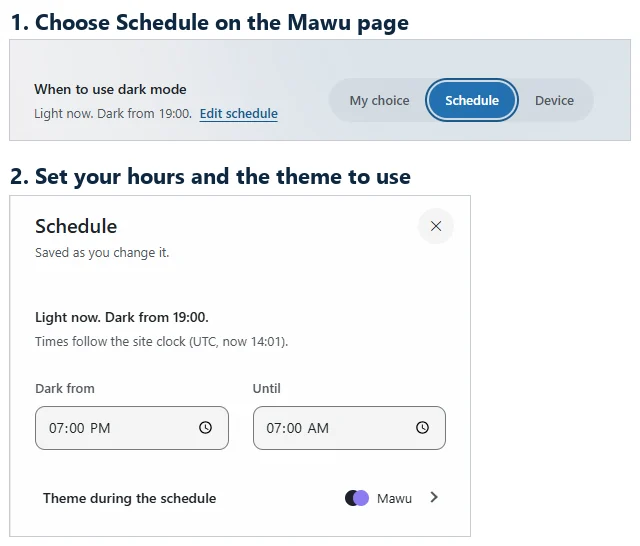
- Open Mawu in the admin menu.
- Under When to use dark mode, choose Schedule.
- Click Edit schedule and set Dark from and Until. The defaults are 7pm and 7am.
- Pick the Theme during the schedule.
Changes save as you make them. A line at the top of the panel tells you what happens next, for example “Light now. Dark from 19:00.”
A few things worth knowing:
- Your everyday scheme can stay light. Use WordPress’s own scheme in the day and let the schedule switch you to a dark theme at night.
- Need light for a moment during your hours? Click the dark mode button in the top admin bar. Mawu keeps it light until your hours end, then the schedule carries on.
- Editors and authors don’t see the Mawu page. They set the same schedule on their profile, in the Mawu Dark Mode Schedule section, then click Update Profile.
- Check your site clock under Settings → General → Timezone. Pick a city, such as London, rather than a fixed offset like UTC+1. Then your hours move with daylight saving.
- Mawu Pro adds sunset to sunrise for your location, and a weekly schedule with different hours for each day.
If you’d rather not set hours at all, choose Device instead. Your admin then goes dark whenever your computer or phone does.
Why per-user, not automatic for everyone
The schedule is set per admin, not site-wide, for the same reason Mawu’s theme selection generally is: two people on the same team can be in different time zones, keep different hours, or simply have different preferences about when their own dashboard should go dark. A freelancer working from 9pm to 1am on purpose doesn’t want their own dashboard fighting a schedule tuned for someone else’s day. Nothing about the feature assumes there’s one correct evening for every user of a site.
If evening screen exposure is something you’re already thinking about, the strongest, best-supported move is still the boring one: less overall screen time in the hour or two before bed, especially sustained close-range reading. A dashboard that dims itself automatically after 7pm isn’t a substitute for that. It’s a small, honest convenience for the times you’re on it anyway. See how scheduled dark mode works, or get Mawu Dark Mode to set it up.
Related Posts
- Every Way to Get Dark Mode in WordPress, Compared
- How to Add a Dark Mode Switch to Your WordPress Site
- Mawu 0.11.0: A WordPress Dark Mode Plugin for Your Admin and Your Website
- How to Keep Parts of a Page Light in WordPress Dark Mode
- Mawu 0.13.0: New Year Themes, Confetti and an Easy Move from WP Dark Mode