Short answer: no, by design. The longer answer is more interesting, because “doesn’t slow down your site” is a claim a lot of plugins make and few actually earn. Ariadne’s version comes down to a specific architectural decision, plus a few deliberate safeguards that keep background work bounded and self-sustaining.
Nothing is ever scored while someone’s looking
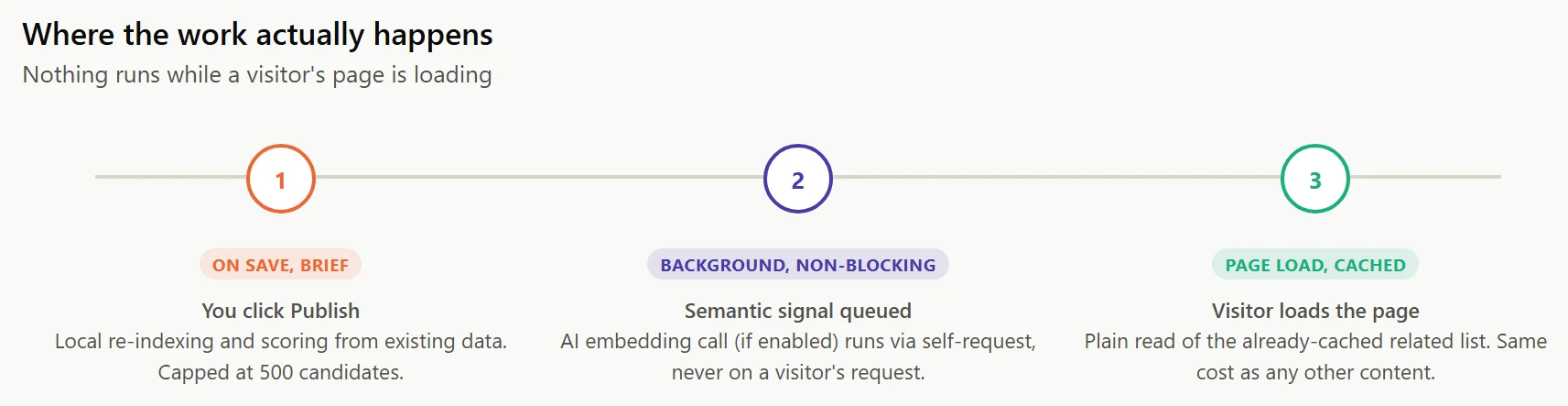
A related-posts list is never computed while a visitor has your site open. It’s computed once, when a post is saved, and cached. Loading a page is a plain read of that cached list, the same cost as loading any other piece of that post’s content. This holds even on a fully-cached page: the cached HTML already has the related-posts markup baked in from whenever the page was last generated, so there’s no separate lookup happening at request time at all, cached or not.
That single decision is most of the answer to “will this slow down my site.” Everything else below is about what happens instead, and why it doesn’t turn into a different kind of problem.
What actually happens when you hit Publish
Saving a post does real work, just not much: re-indexing that post’s own text locally for keyword matching, and computing its related list from whatever data already exists. If AI-powered matching is on and the content changed, generating the semantic signal gets queued for the background instead of running immediately. That’s a deliberate rule, not an oversight: an external API call is never something a real visitor, or an editor waiting on the Publish button, has to sit through.
Why there’s a hard cap on candidates, not just a soft target
How many candidate posts ever get compared against one post is capped, 500 by default and adjustable, regardless of how large your matching pool is configured to be. This bounds the actual work a single post save can trigger, no matter how loosely you’ve configured the matching pool. A large or wide-open pool never turns into unbounded work on the request that’s trying to finish saving your post.
Background jobs that don’t wait around for traffic
WP-Cron, the mechanism most WordPress background jobs rely on, only fires on real visitor requests by default, which means a job due for its next tick on a quiet site with little traffic could otherwise stall between visits. Ariadne’s background jobs use a self-request mechanism instead, so processing keeps advancing on its own rather than waiting for the next person to load a page. A large backfill on a fresh install, or a batch of edits after a bulk import, finishes in reasonable time either way, busy site or quiet one.
How to check this yourself instead of taking it on faith
You don’t have to trust any of the above blindly. The Post Status admin screen shows real job progress and per-post status, so you can watch a backfill actually advance rather than wondering whether it’s stuck. If you want harder evidence that nothing is happening at render time, a query-profiling plugin like Query Monitor will show you directly: load a post with related content showing, and you won’t see a related-posts scoring query in the request, only a plain read of already-cached data.
Does it play well with caching plugins?
Yes, and for the same reason it doesn’t slow down an uncached site: nothing is computed at render time, so a related-posts block is just more cached content as far as your caching plugin is concerned. The one thing worth knowing is that changing a matching weight or another sitewide setting won’t show up on an already-cached page until that page’s cache clears or expires, exactly like any other content change would need.
See the full does Ariadne slow down my site documentation for the short version of all of this.
Related Posts
- Why Tags Matter More Than Categories for Related Posts
- How Much Does AI-Powered Related Posts Actually Cost?
- Related Posts and WooCommerce: Showing Products Related to Blog Content
- Pinning, Excluding, and Cornerstone Posts: Manual Control Over Related Posts
- Inline vs. End-of-Post: Where Should Related Posts Actually Go?