A lot of related-posts marketing leans on one sentence: “it’s great for internal linking.” That’s true, but it’s not the whole story. Here’s what internal links actually do for a search engine, where the evidence is solid, where it’s an analogy dressed up as fact, and whether an automated widget is really doing the same job as a hand-placed link.
What an internal link actually does for crawling
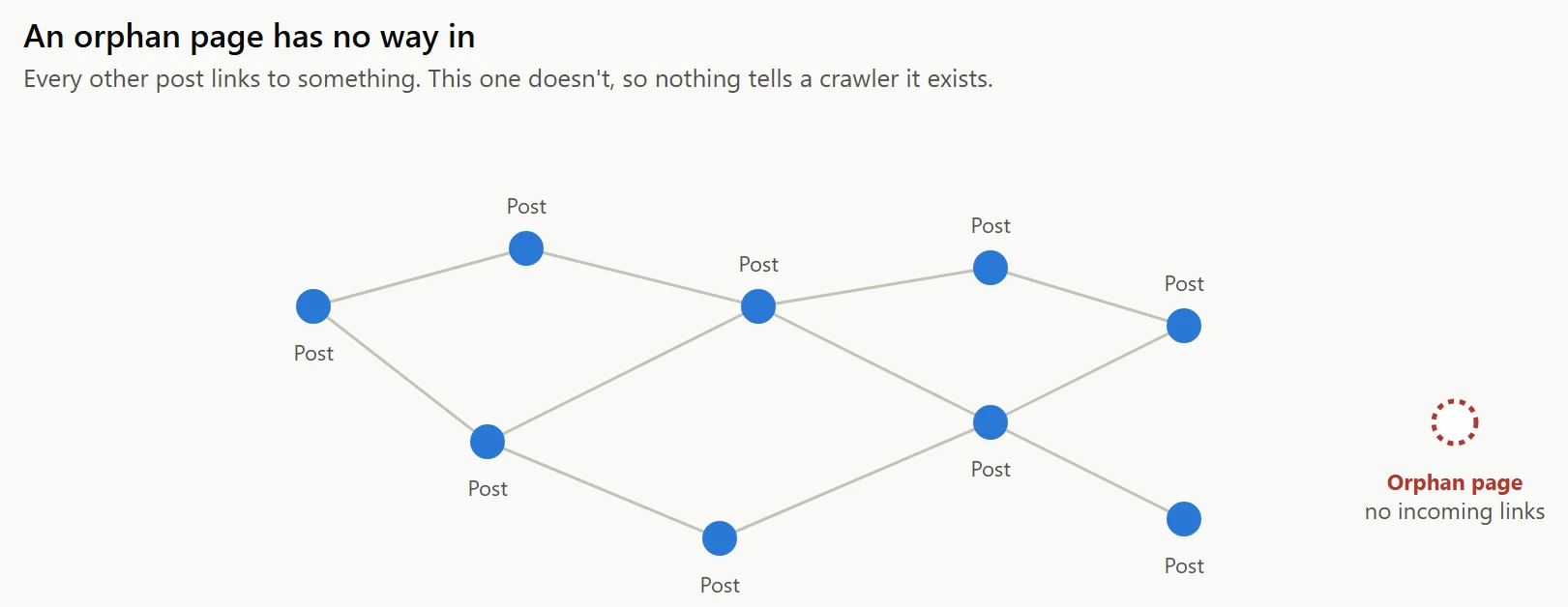
Start with the part that isn’t in dispute. Google’s own Search Central documentation says plainly that links are how it finds most of the web: “the vast majority of new pages Google finds every day are through links.” A page with no internal links pointing to it is an orphan page. Nothing tells a crawler it exists, so it’s less likely to get crawled, and less likely to show up in search at all.
This part matters for a related-posts widget specifically, because of what it needs to work: a real <a href>. Google’s own guidance is specific about this, too, warning that JavaScript-only navigation (a link that only fires on a click handler, with no real href) can get missed entirely. A related-posts block built from actual anchor tags, which is how every plugin worth using builds one, doesn’t have that problem.
Link equity
You’ll see internal links described as “passing PageRank” or “passing link equity,” often illustrated with something like: 100 outbound links on a page means each one passes roughly a hundredth of that page’s authority. That’s a genuinely useful way to think about it. It’s an industry explanatory model, popularized by sites like Ahrefs, not a formula Google has ever confirmed as its literal current algorithm.
Internal links almost certainly do distribute some kind of authority signal between pages on your own site, and a page with more relevant internal links pointing to it tends to do better than an identical page with none. The exact math behind that isn’t public, and treating the 100-links-1%-each version as gospel is more precise than the evidence actually supports.
Topical authority and topic clusters
“Topic clusters” and “topical authority” show up constantly in SEO content: build a pillar page, link it to a cluster of supporting posts, and Google will supposedly recognize your site as an authority on the subject. It’s a genuinely popular content strategy, and organizing content that way has real, practical benefits for readers and for site structure.
Whether it’s a distinct ranking mechanism Google itself uses is a different question, and the SEO industry isn’t unanimous. John Mueller of Google has pushed back on the term directly, telling one site owner asking about topical authority not to worry about it, framing it as a rebranding of ordinary topical relevance rather than a separate signal search engines evaluate. That’s a real disagreement between how the term gets marketed and how Google’s own spokesperson describes it, and a related-posts article that only repeats the marketing version isn’t being straight with you.
Should you ever nofollow an internal related-post link?
No, and this is one of the more settled questions in the whole topic. nofollow exists to tell a search engine you don’t vouch for a destination, usually because it’s paid, untrusted, or user-submitted content you don’t control, like a comment section link. None of that applies to a related-posts link pointing at another article on your own site that you wrote and stand behind. Google’s own guidance treats internal links as a normal part of site structure, not something that needs a disclaimer.
The confusion usually comes from a different, unrelated practice: nofollowing internal links to low-value utility pages, a login page, a cart page, an admin-facing archive, specifically to keep a crawler from wasting time on pages that were never meant to rank. That’s a real, separate technique, and it has nothing to do with related-posts links pointing at genuine articles.
How many internal links is too many
There’s no hard number, but the underlying logic is straightforward once you connect it to the link-equity model above: if a page’s authority gets divided among its outbound links, a page with 300 links on it is dividing that authority into much smaller pieces than a page with 15. A related-posts block adding three to five extra links to the bottom of an article is a rounding error next to that. A site nav, footer, and sidebar links repeated identically on every single page, which some themes do by default, adds up to a much bigger number across the whole site than most site owners realize.
The practical version: don’t worry about a related-posts widget’s own link count, worry about the total per page once you add navigation, footer, and any other repeated site chrome. That’s the number that actually gets large enough to matter.
Crawl budget
Google has openly said it allocates a finite amount of crawling attention to a given site, and calls this crawl budget. For the overwhelming majority of sites, this genuinely doesn’t matter. Google’s own guidance is direct about it: crawl budget is a real concern for sites with many thousands of pages, not a blog with a few hundred posts, which gets crawled thoroughly regardless.
Where it connects back to related posts: on a genuinely large site, internal links are one of the signals that help a crawler prioritize which pages matter enough to revisit often. An orphaned page on a small blog is a missed opportunity. An orphaned page on a site with fifty thousand URLs and a limited crawl budget can go effectively undiscovered, which is the scenario where a related-posts widget’s guaranteed, sitewide linking earns its keep the most.
Anchor text
Unlike the two sections above, anchor text best practice isn’t contested. Google, Moz, Backlinko, and Ahrefs converge on the same guidance: descriptive, varied anchor text that tells a reader (and a crawler) what the destination page is actually about, rather than generic phrases like “click here” repeated everywhere, or the exact same anchor text reused across links pointing at different pages.
This is where a related-posts widget has a structural advantage over a lot of hand-placed linking: the anchor text is the post’s actual title, every time, automatically. Nobody has to remember to write a descriptive link. It’s just what the link already says.
Does an automated widget do the same job as an editorial link?
Here’s the nuance most related-posts content skips entirely, and it’s worth getting right because there’s a specific, real misquote circulating around it.
In 2016, John Mueller was asked directly about related-posts widgets and internal linking. His actual answer was neutral to positive: a related-posts widget is a legitimate way to build internal links, and there’s no need to nofollow those links. That’s the real statement, about the exact topic this article is about.
Separately, in a different conversation about an entirely different subject, Mueller has talked about “zero-value automated links,” in the context of third-party link-building widgets and backlink schemes, sites paying to have their links inserted into unrelated content elsewhere on the web. That statement gets pulled out of context surprisingly often and applied to on-site related-posts widgets, as if Google had said your own site’s related-posts block is worthless. It hadn’t. Those are two different statements about two different things, and conflating them is a genuine, common mistake worth correcting rather than repeating.
So where does that leave the honest answer? A related-posts widget is a legitimate, Google-sanctioned form of internal linking. It’s also not a replacement for a hand-placed link in the body of an article, pointing a reader toward a specific, chosen page at the exact moment it’s relevant to what they’re reading. The practitioner consensus, and it’s a reasonable one, treats an automated widget as a safety net: it guarantees every post links to a few others, catches pages an editor might have forgotten to link to, and stops posts from going orphaned. It doesn’t decide, on its own, which three links in an article matter most to a human reader. That’s still an editorial judgment call, and no plugin, ours included, makes that call for you.
What this means in practice
| Claim | How solid is it |
|---|---|
| Internal links help pages get discovered and crawled | Solid. Google’s own documentation. |
| Internal links distribute some form of authority between pages | Reasonable, but the specific math is an industry model, not a confirmed formula |
| Topic clusters make Google see your site as a topical authority | Disputed. Marketing framing versus Google’s own pushback |
| Descriptive, varied anchor text helps | Solid. Universal agreement across sources |
| A related-posts widget is legitimate internal linking | Solid, confirmed directly by Google |
| An automated widget replaces hand-placed editorial links | No. Best treated as a baseline, not a substitute |
None of this is a reason to skip a related-posts widget. It’s a reason to use one for what it’s actually good at: guaranteed, well-anchored, always-on internal linking that never leaves a post orphaned, while still writing real in-content links to the pages that matter most, the way you always should have.