A lot of blog posts about related posts throw around a big scary bounce rate percentage and move on. We wanted the real story: what bounce rate actually measures today, whether it affects your rankings at all, and why showing someone a next post to read genuinely changes what they do next.
What bounce rate actually means now
If you learned about bounce rate years ago, your definition is out of date. In old Google Analytics, a single-pageview visit was always a bounce, no matter how long that person sat and read. In GA4, a session only counts as a bounce if it fails all three of these: lasting at least 10 seconds, firing a key event, or reaching a second page. Someone who reads a 1,500-word post for four minutes and then leaves is not a bounce anymore. They cleared the 10-second bar on their own.
This matters for any before-and-after comparison. A site that moved from old Google Analytics to GA4 will often see its bounce rate drop for that reason alone, before a single related post gets added. If you are comparing your own numbers over time, check which version produced each number first.
Does bounce rate even affect your rankings?
No, and Google has said so directly, more than once. Matt Cutts said it in 2010. Gary Illyes said it again in 2015. John Mueller said it again in 2022. Google does not use bounce rate as a ranking signal.
A well-known claim going around says otherwise, usually pointing to a Backlinko study. That study measured time-on-site, not bounce rate, and never claimed bounce rate itself was a ranking factor. The two got merged into one myth somewhere along the way.
So this is not an SEO trick. Related posts will not move your rankings by changing a bounce number. What they actually change is simpler and, honestly, more useful: whether a real person sticks around.
Why showing a next post actually works
The Nielsen Norman Group has a name for this: information scent. A visitor decides whether to click something based on two quick guesses. Will this satisfy what I came here for? How much effort will it take to find out? As long as each click feels like it is getting them closer, they keep going. The moment the scent goes cold, they leave, usually back to Google to start over.
A related-posts section is not a trick on top of this behavior. It is a direct answer to it. A reader who just finished your article is, at that exact second, deciding whether anything else on your site is worth their time. Give our site visitors a real next step and some of them take it. Give them nothing and they default to leaving.
The scent has to actually be strong, though, or none of this works. A related-posts block full of loosely-connected or repetitive suggestions doesn’t create scent btu rather it creates noise, and a reader can tell the difference in about a second. This is the part most bounce-rate advice skips entirely: the behavioral effect only shows up when the matches are actually good. A plugin that matches on broad categories alone, so every post in your “News” section links to every other post in “News,” is technically showing related posts without giving anyone a real reason to click.
Where related posts fit among other engagement tactics
Related posts aren’t the only means for keeping someone on a page longer, and it’s worth knowing where they actually sit relative to the others, since some get more marketing attention than results.
Site speed comes first, structurally, because nothing else matters if the page hasn’t finished loading. Backlinko’s own research found pages with embedded video see an 11% lower bounce rate than pages without, which sounds impressive until you consider that adding video to every post isn’t realistic for most publishers. Internal search also matters for a smaller, more deliberate slice of visitors who already know they want something specific and just need to find it, which is a different job than related posts, which work on visitors who weren’t looking for anything in particular yet.
Related posts sit in a specific, they’re the only means of these that requires zero extra visitor effort, works identically on every single post without anyone deciding what to feature, and costs nothing per pageview once it’s set up. That’s a real advantage. It’s also why they’re not a replacement for the others, just the piece that costs the least ongoing attention to keep running.
The Albuquerque Journal, a newspaper with about 580,000 print subscribers and 3 million monthly pageviews at the time, turned on Jetpack’s Related Posts feature. Traffic across the site went up by nearly 4%.
What normal bounce rates actually look like
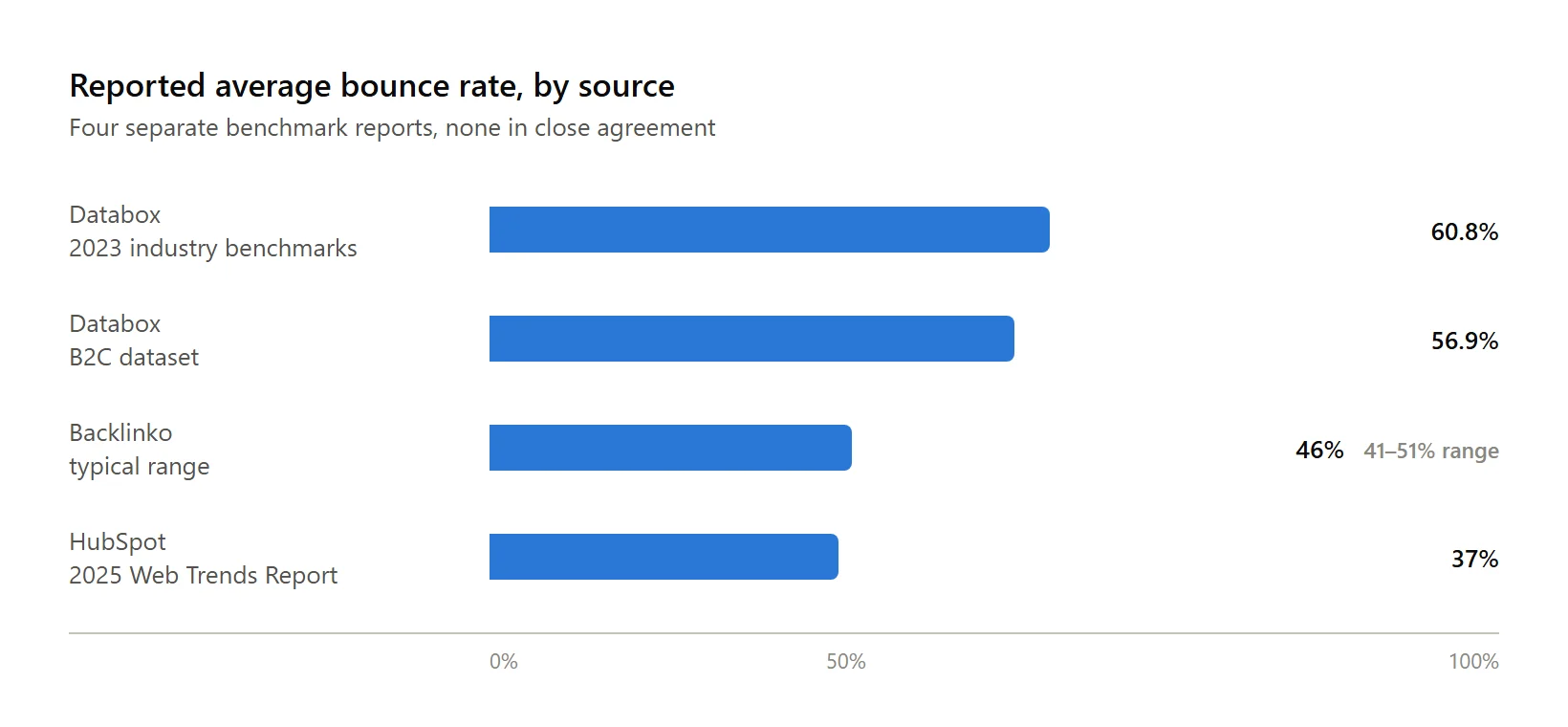
Before you panic about your own number, here is what typical looks like, from two separate benchmark reports:
| Source | Reported average | Range or detail |
|---|---|---|
| Databox, 2023 industry benchmarks | 60.78% median | 47% (real estate, apparel) to 67% (construction) |
| Databox, B2C dataset | 56.9% median | Based on 800+ companies |
| HubSpot, 2025 Web Trends Report | 37% average | Self-reported survey of U.S. marketers, 7 pages per visit average |
| Backlinko | 41 to 51% typical range | Blogs can run as high as 90%; ecommerce as low as 20% |
Notice these numbers do not agree with each other closely. That is normal. Bounce rate depends heavily on your industry, your traffic source, and which analytics platform generated the number. Treat any single benchmark as a rough compass, not a grade.
Turn on related posts and check back in a month, and sometimes nothing’s changed. That’s a possible, common outcome, and it’s worth knowing the reasons before concluding the whole idea doesn’t work for your site.
The most common one is thin tagging. If most of your posts share only a broad category and nothing more specific, the related list that comes back is technically populated but not actually relevant, and a reader can tell. The second most common is placement a visitor never sees: a related-posts block sitting below the fold on a long article, with no visual weight to pull the eye down, gets scrolled past by anyone who was already going to leave. The third is measuring the wrong thing entirely, watching overall bounce rate site-wide instead of pages per session specifically on the posts where related content actually shows up, which buries a real, smaller effect inside a much larger number that moves for a dozen unrelated reasons.
What related posts have actually done for other sites
A few vendor-published case studies are worth mentioning, with the honest caveat that a company selling a recommendation product will naturally publish its wins, not its misses. Recombee, a recommendation engine vendor, reports 9GAG saw a 37% increase in post views and a 22% increase in overall interactions after adding related content. The Telegraph reported a 35% click-through increase on article pages. Slickdeals reported a 70% click-through increase to deal detail pages. Take these as directional evidence of what is possible, not guaranteed numbers for your own site.
Related posts will not trick Google into ranking you higher. What they do is give a reader who already finished your article a real reason to stay.
Ariadne handles this automatically: every published post gets matched against the rest of your site in the background, and the related-posts list is ready and cached before anyone ever loads the page.
Related Posts
- Scheduled Dark Mode and What the Sleep Research Actually Says
- Why Tags Matter More Than Categories for Related Posts
- Inline vs. End-of-Post: Where Should Related Posts Actually Go?
- What Happens to Your Related Posts Data If You Downgrade from Pro or Pro+?
- How to Add Related Posts to WordPress Without a Plugin