“AI-powered” plugins have earned some skepticism about what actually happens to your content once you install them. The honest answer for Ariadne is short enough to state plainly: on the Free plan, nothing leaves your site, ever. On Pro and Pro+, exactly two things can, both optional, both under conditions you control. Here’s the complete list, with nothing left out.
What never leaves your site, on any plan
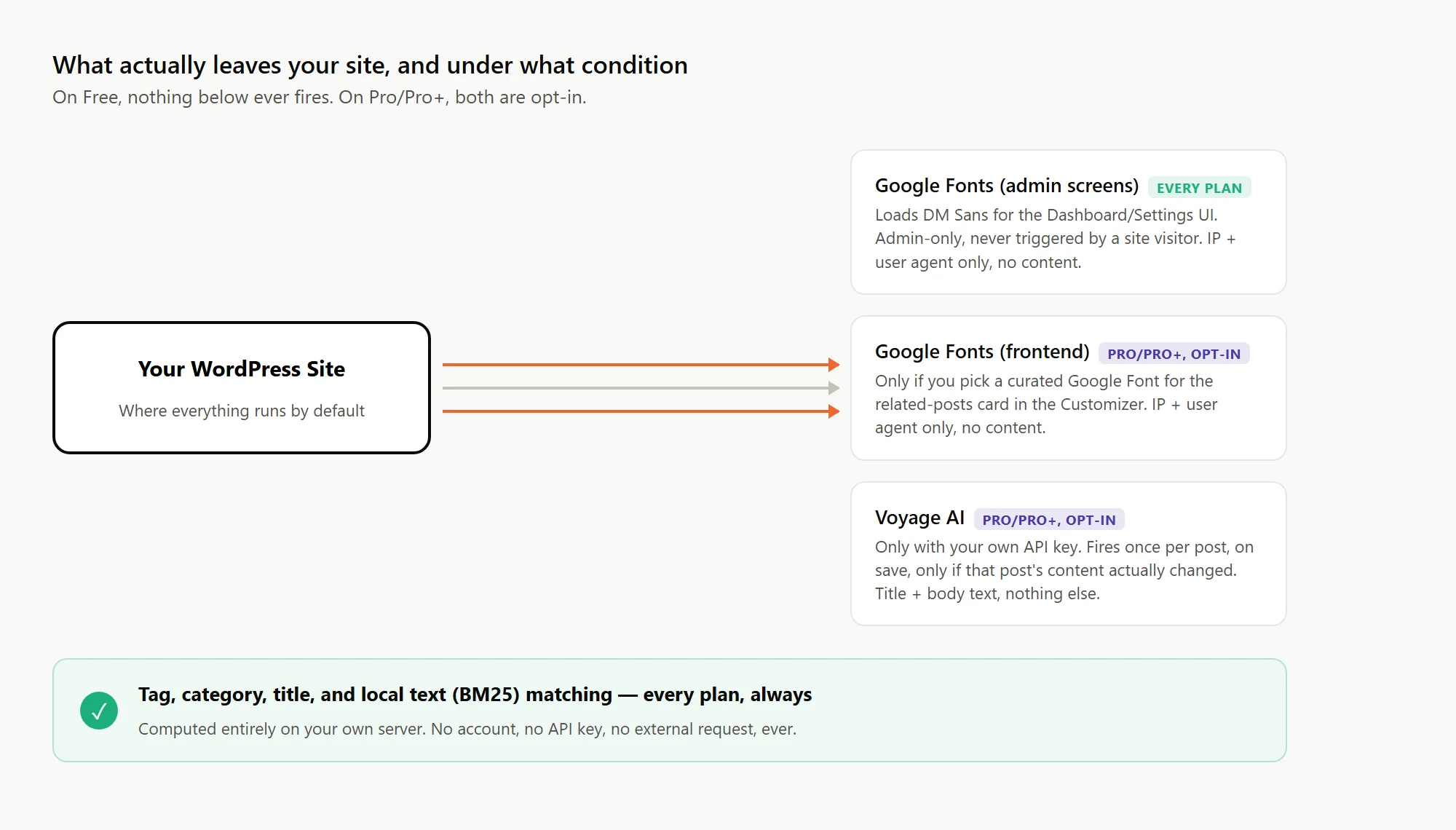
Tag overlap, category overlap, title similarity, and local text scoring (BM25, a lexical relevance algorithm) are all computed directly on your own server. No account, no API key, and no external request are involved in any of it. This is the entire Free plan: a fully-functioning related-posts engine that never sends a single byte of your content anywhere. If you install Ariadne and never touch a Pro or Pro+ setting, that’s the whole story, permanently.
Google Fonts: admin screens, and only if you opt into it on the frontend
Ariadne’s own Dashboard, Settings, and Post Status admin screens load one typeface, DM Sans, from Google’s font CDN to render the plugin’s branded interface. This happens only on those three admin screens, only for a logged-in administrator looking at them. A visitor to your actual site never triggers this request, on any plan.
Separately, if you’re on Pro or Pro+ and specifically choose one of the curated Google Fonts for your Related Posts card styling in the Customizer, that one font family also gets requested from the same CDN, this time on your site’s public frontend. In both cases, only the standard information any browser request carries, your IP address and user agent, reaches Google. Nothing about your post content, your visitors’ identity, or anything else is involved.
Voyage AI: the one call that touches your actual content, and exactly when
This is the one genuinely worth reading carefully if privacy is why you’re evaluating this plugin. If you’re on Pro or Pro+ and have entered your own Voyage AI API key, Ariadne sends each post’s title and body text to the Voyage AI API once, when that post is saved, and only if its content has actually changed since the last time. That’s the entire trigger condition. Nothing is sent on a page view, nothing is sent on a schedule, and nothing is sent for a post that hasn’t changed.
Three things about this are worth being explicit about, because they’re easy to gloss over in a shorter FAQ answer:
- It’s entirely opt-in. No API key configured means no calls happen, full stop. The Free tier’s local matching keeps working exactly the same either way.
- It’s your own Voyage account and key, not a shared one Ariadne or Uwawp operates or can see traffic through. Voyage bills you directly, and Ariadne never sits between your site and Voyage as a proxy.
- It’s title and body text only, sent for the purpose of generating one embedding vector. Nothing else about your site, your visitors, or your WordPress installation is included in that request.
Why this is worth publishing plainly instead of burying in a FAQ
A lot of “AI-powered” WordPress plugins are vague about this by default, sometimes because the actual data flow is more complicated than a site owner would expect, sometimes because burying it serves the plugin more than the user. Ariadne’s answer doesn’t need softening: Free is completely local, and Pro/Pro+’s one external call is opt-in, uses your own account, and fires under one specific, narrow condition.
None of this needs to be taken on trust either. The call to Voyage happens directly from your own server to Voyage’s API, using your own key, which is exactly what makes it easy to verify independently: watch your own Voyage usage dashboard before and after saving a post. On Free, or on Pro/Pro+ with no key configured, nothing moves, ever. On Pro/Pro+ with a key configured, you’ll see one request appear per post saved with changed content, and nothing beyond that. It’s your account’s own usage log, not a claim you have to take Ariadne’s word for.
If you want the condensed reference version, or need the exact wording for your own site’s privacy policy, see the full privacy and external services documentation.