WP Dark Mode is one of the most popular dark mode plugins for WordPress. If you want something else, Mawu Dark Mode is worth a look. Its free version does more, it is easier to read in the admin, and it adds far less code to your pages.
Mawu is our plugin, so keep that in mind as you read. To keep this fair, we installed both free versions on the same kind of fresh test site and took screenshots at each step. Every claim below comes from that test, each plugin’s feature list or its code. We also say where Mawu falls short.
The short answer: pick Mawu if you want dark mode for your website and your admin with no paid plan. Its free version includes 26 themes, page excludes and an admin schedule. It can also bring over your WP Dark Mode settings for you. Every link in its dark dashboard passed the contrast check, and it adds about 30 KB to a page instead of about 449 KB. Stay with WP Dark Mode if you want social share buttons, or visitor stats without paying for them.
How we tested
We set up two clean sites with WordPress 7.1.4, PHP 8.2 and the Twenty Twenty-Five theme. Each site had the same sample post with a photo, a quote, a button and a table. One site got Mawu Dark Mode 0.12.0. The other got the free version of WP Dark Mode, 5.3.21. We changed only the settings named below.
The free versions side by side
| Feature | Mawu Dark Mode (free) | WP Dark Mode (free) |
|---|---|---|
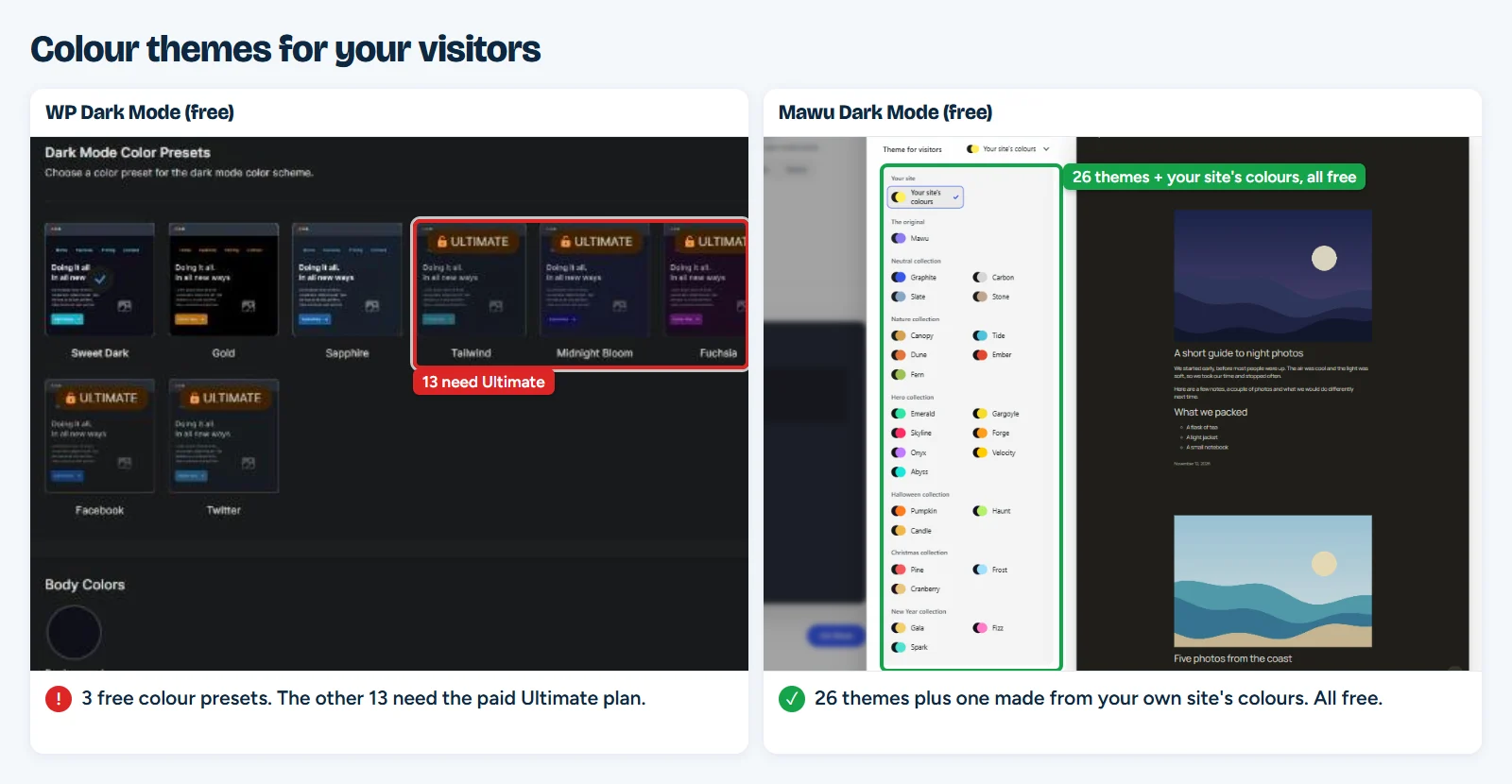
| Colour themes | 26, plus your site’s colours | 3, plus an automatic mode (13 more in Ultimate) |
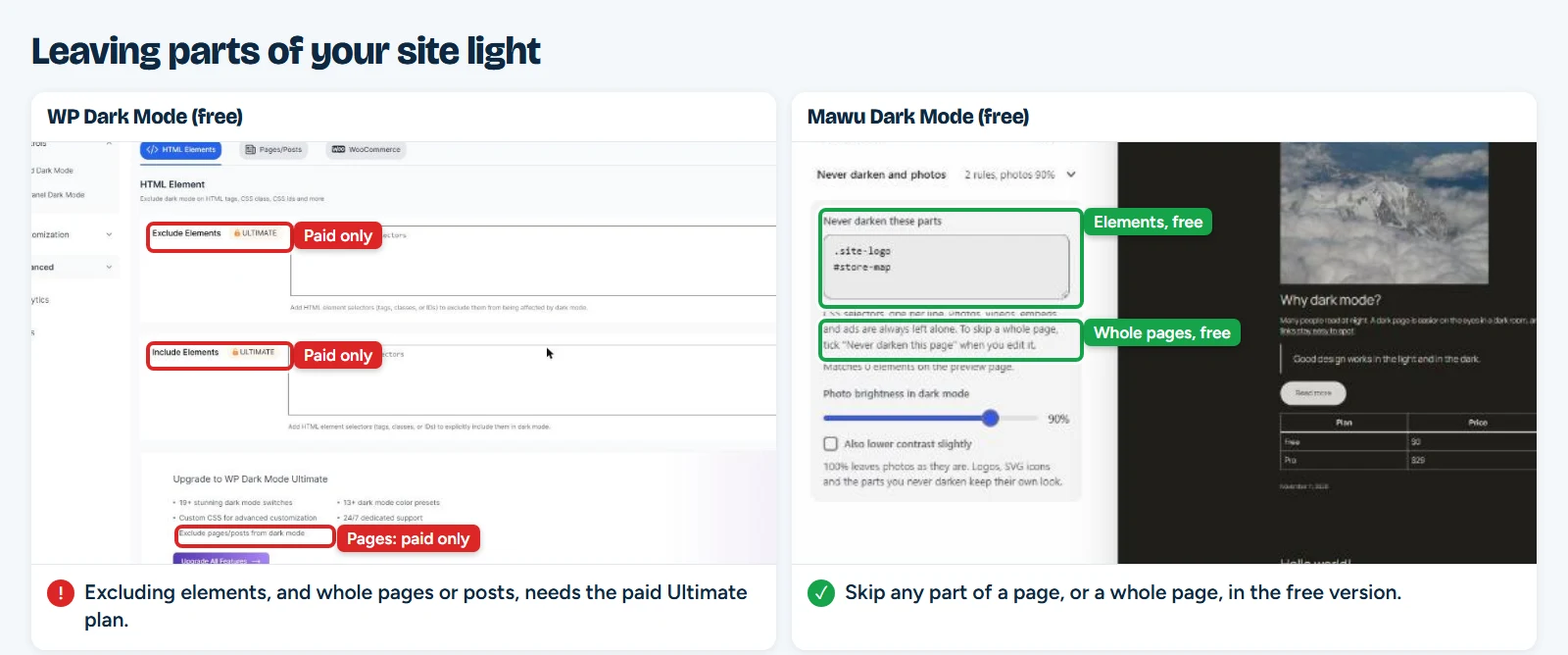
| Exclude elements or whole pages | Yes | Paid (Ultimate) |
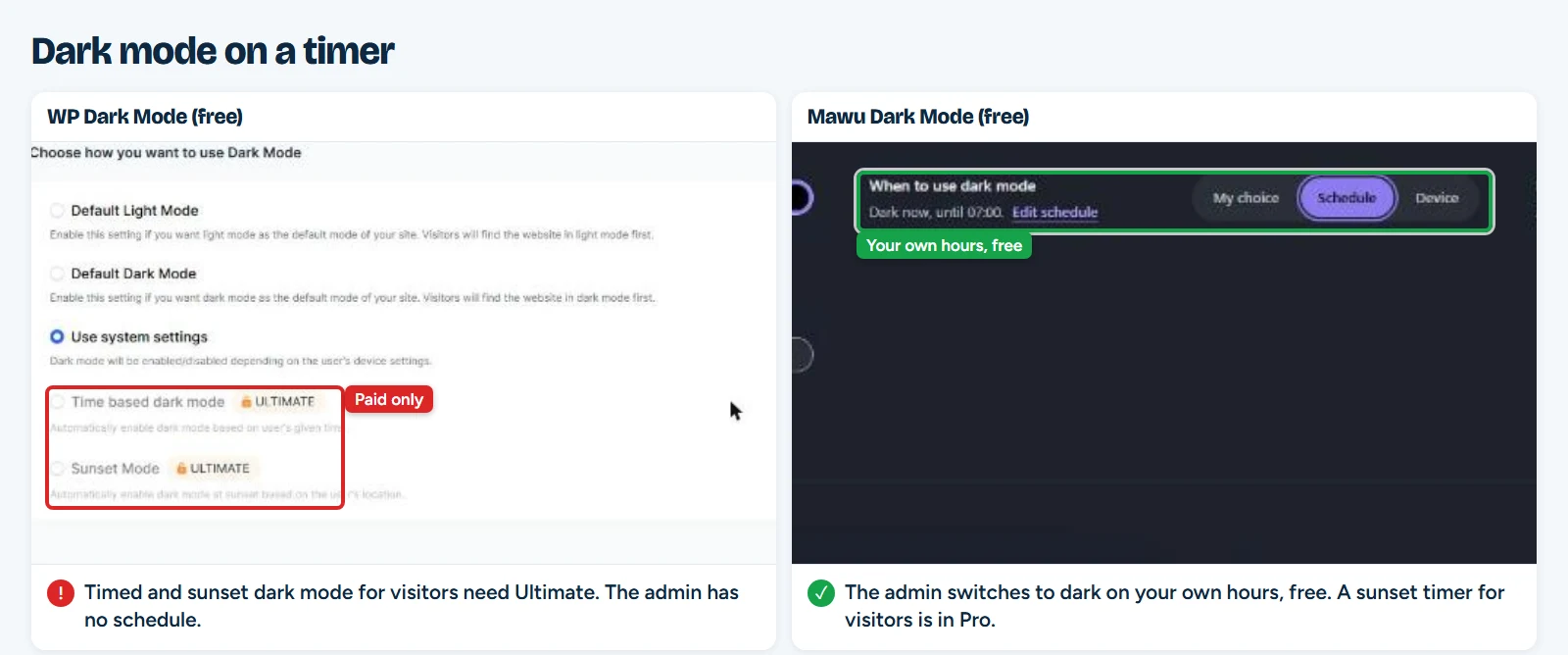
| Schedule | Admin: yes, your own hours. Visitors: Pro | Admin: no. Visitors: paid (Ultimate) |
| Visitor dark mode after you install | Off until you turn it on | On straight away |
| Dashboard links that pass WCAG AA contrast | All 35 of 35 | 4 of 38 |
| Block editor | Dark with the rest of the admin | Stays light; dark is a second setting |
| Photos dimmed out of the box | Yes, to 90% | No, full brightness |
| Switch tells screen readers if dark mode is on | Yes | No (default switch, in our test) |
| Code added to each page | About 30 KB | About 449 KB |
| Follow the visitor’s device | Yes | Yes |
| Switch: floating, shortcode, block, Elementor | Yes | Yes |
| Links that open a page in dark mode | Yes | Yes |
| Visitor stats | Pro (off by default, no cookies) | Yes |
| Social share buttons | No | Yes |
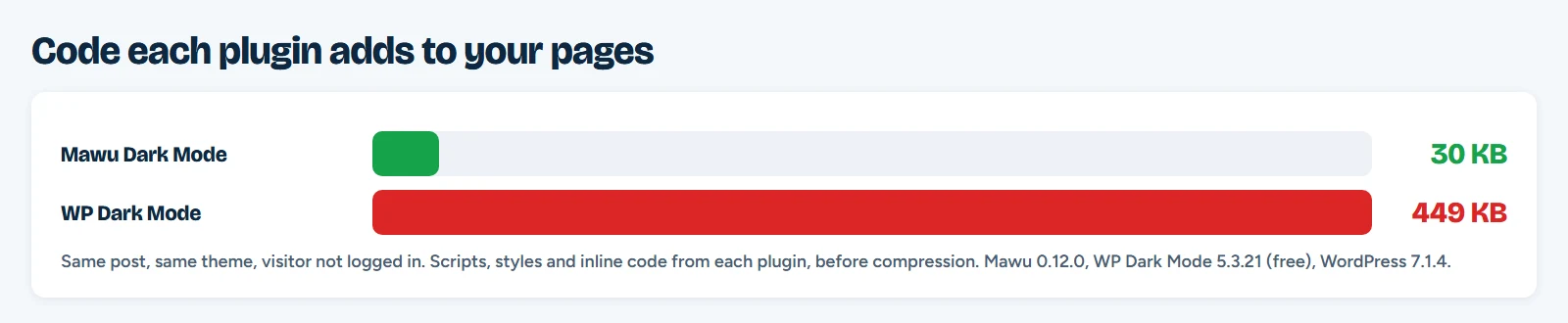
Page sizes come from our test post, with the visitor logged out, before your server compresses anything. They add up the scripts, styles and inline code each plugin puts on the page.
More in the free version
Mawu has 26 colour themes, and all of them are free, for your admin and for your visitors. It can also build a dark theme from your own site’s colours. WP Dark Mode’s free version has three colour presets for visitors, plus an automatic colour mode. Its other 13 presets come with the paid Ultimate plan.
You can also leave parts of your site light for free. In Mawu, list a logo, a map or a chart under “Never darken these parts”, or tick “Never darken this page” when you edit a page. In WP Dark Mode, the Exclude Elements box carries an Ultimate badge, and excluding pages and posts is listed as an Ultimate feature too.
Schedules work differently in each plugin. Mawu’s free schedule turns your admin dark at night and light in the morning, on your own hours. WP Dark Mode’s free version has no schedule for the admin. Its timed and sunset modes for visitors are part of Ultimate. Mawu’s sunset timer for visitors is part of Mawu Pro.
Off until you say so
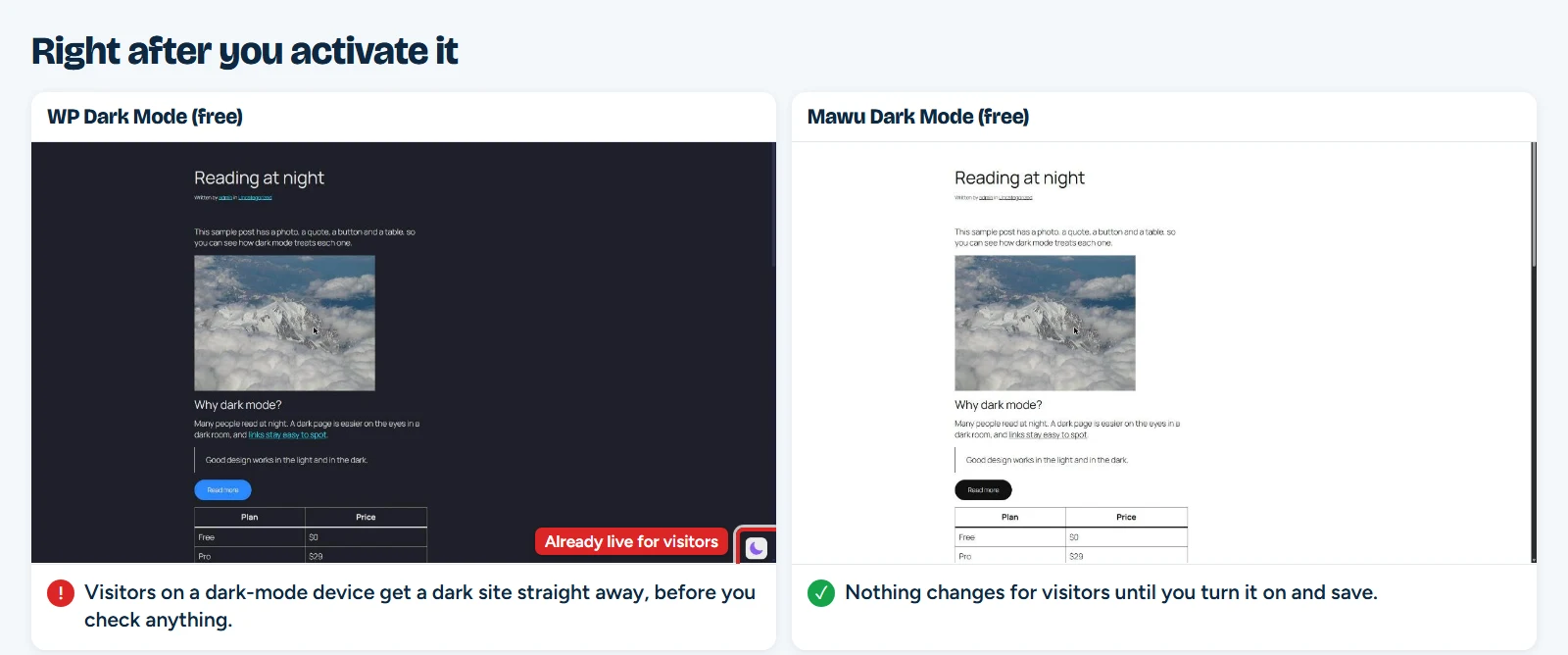
WP Dark Mode turns dark mode on for visitors as soon as you activate it. On our test site, anyone with a dark-mode phone or laptop saw a dark site at once, before we had even looked at it.
Mawu does nothing on your website until you turn it on. You can check your site first in a live preview, in light or dark, on desktop or phone. Nothing changes for visitors until you save.
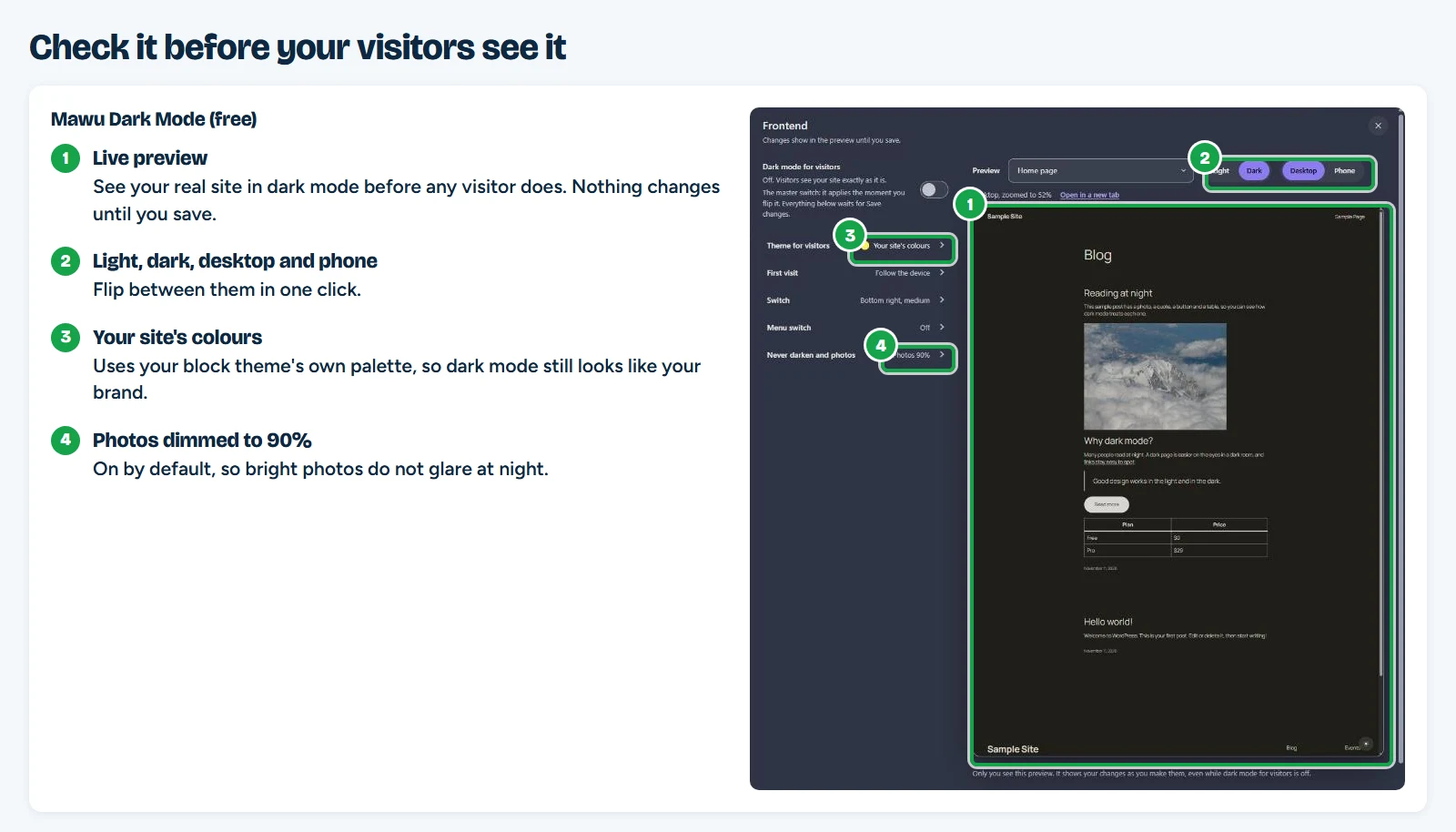
On a block theme, Mawu’s default visitor theme uses your theme’s own colours, so dark mode still looks like your brand. Photos are dimmed to 90% from the start, so they do not glare at night. In our test, WP Dark Mode left photos at full brightness. It can dim them too, but that setting starts off.
Easier to read in the dark admin
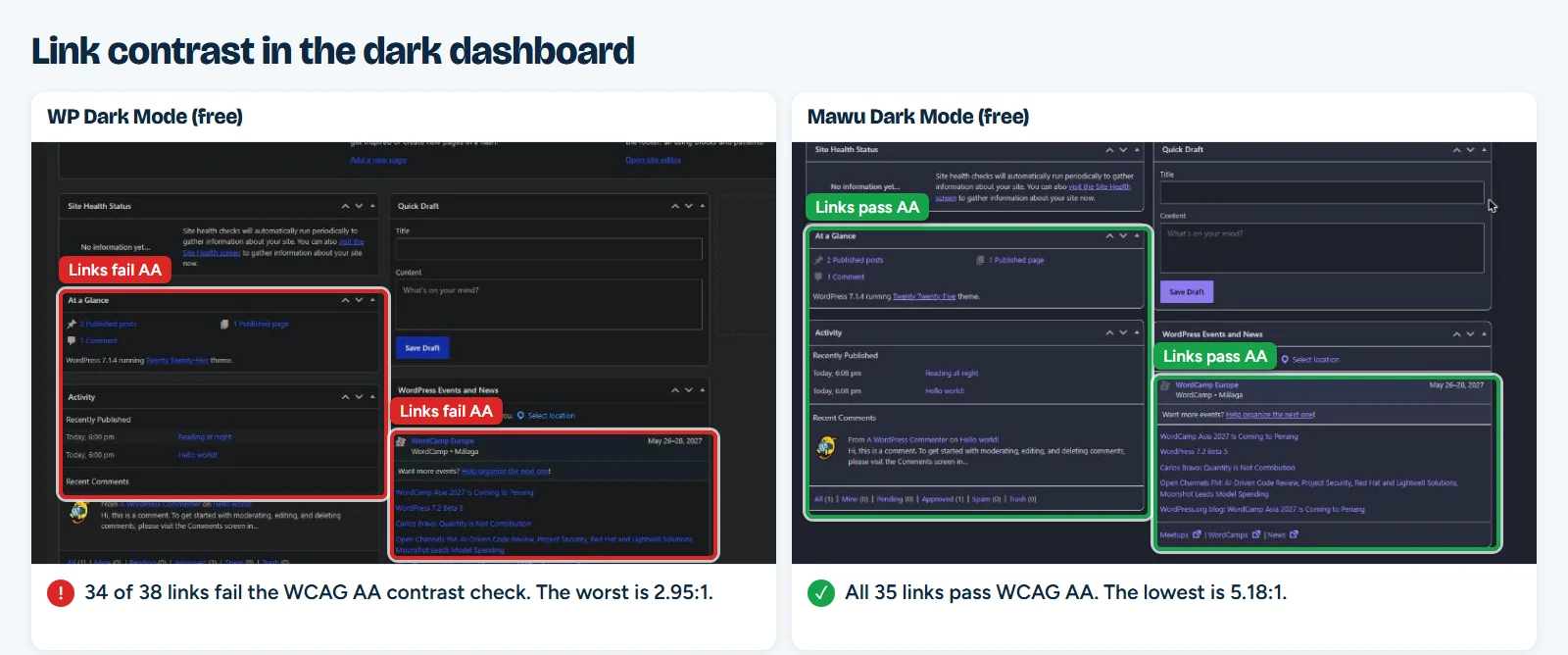
A dark dashboard only helps if you can read it. We checked every link on the main Dashboard screen against WCAG AA, the contrast level most accessibility rules point to. Text needs a ratio of at least 4.5 to 1.
With Mawu, all 35 links passed. The lowest was 5.18 to 1. With WP Dark Mode, 34 of 38 links failed, and the worst was 2.95 to 1. Most were dark blue links on a dark background.
The visitor switch is easier to use too. Mawu’s switch is a real button. It works with the Tab key, Enter and Space, and screen readers announce whether dark mode is on. WP Dark Mode’s switch also works from the keyboard, but in our test it did not tell screen readers whether dark mode was on or off.
The whole admin, not just the website
Mawu started as an admin dark mode, and that is still its strength. Its themes are real WordPress admin colour schemes. You find them under Users → Profile, next to “Default” and “Midnight”. Each person on your site picks their own.
When you turn it on, Mawu darkens the dashboard, other plugins’ settings pages, the block editor and its writing canvas, the Classic Editor and the login page. A button in the top bar switches it on or off from any screen.
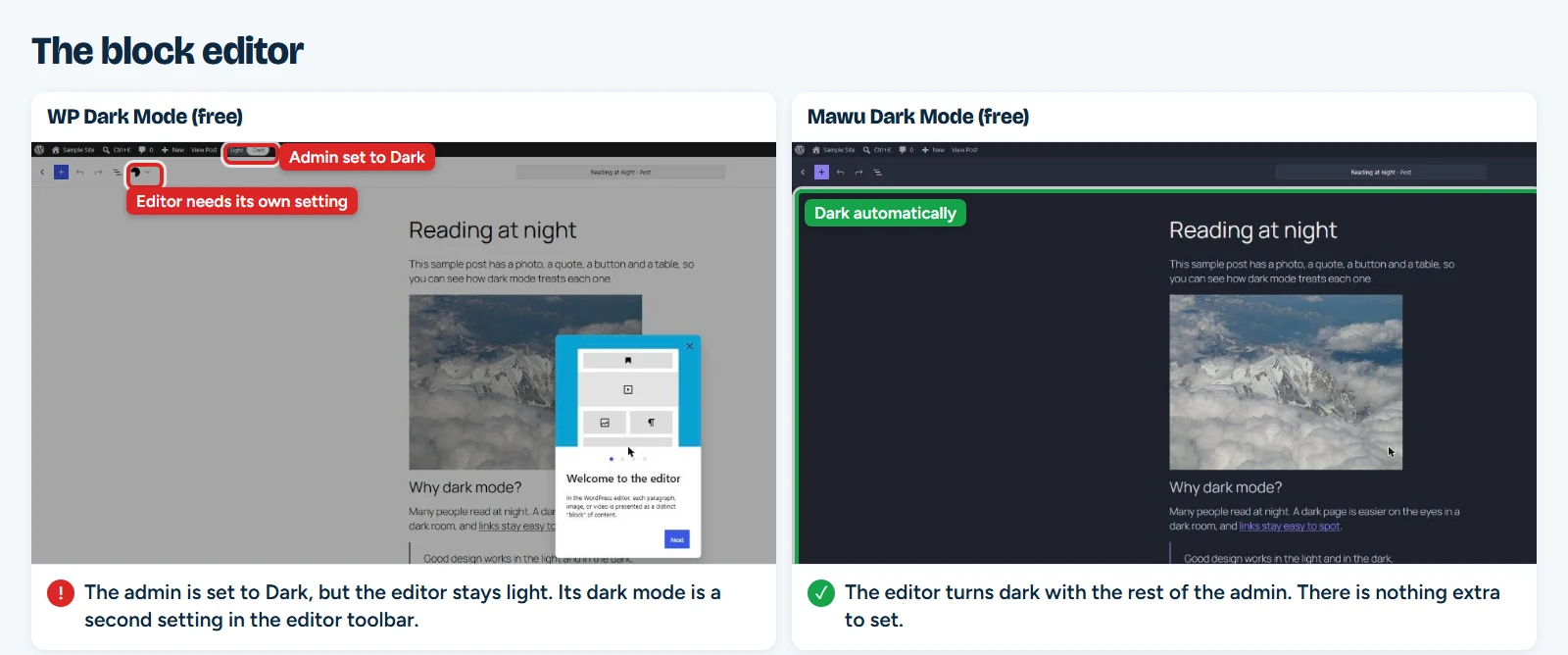
The block editor is where the difference shows. With WP Dark Mode, we set the admin to dark, opened a post, and the editor stayed light. Its editor dark mode is a second setting in the editor toolbar. Even after we turned that on, the status bar at the bottom stayed white. With Mawu, the editor was dark as soon as it opened.
Lighter pages
Every visitor downloads a dark mode plugin’s code, even if they never touch the switch. On our test post, Mawu added about 30 KB. WP Dark Mode added about 449 KB, around 15 times more. On a cheap phone with a slow connection, that difference shows.
Mawu also works with speed plugins. The switch keeps working when LiteSpeed Cache, W3 Total Cache, Autoptimize, WP Fastest Cache or Breeze combine or delay scripts.
Private by default
Mawu’s free version keeps no record of your visitors. No data leaves your site unless you opt in.
Mawu Pro can show how many visitors use dark mode, and whether it came from their device, the switch or your site’s setting. These stats are off until you turn them on. Your site keeps only daily totals, in its own database, with no cookies and no personal data.
When WP Dark Mode is the better pick
- Its free version shows how many visitors use dark mode. In Mawu, visitor stats are part of Pro.
- It has social share buttons built in. Mawu does not.
- Its free version has a keyboard shortcut for visitors. Mawu’s shortcut is for the admin.
Prices
Mawu’s free version is complete. Every theme, both editors, the login page, the schedule and dark mode for visitors stay free. Mawu Pro costs $29 a year or $89 once for one site. It adds a theme builder, sunset and weekly schedules, dark versions of your images and videos, visitor stats with email reports, and more.
Ultimate costs $49 a year or $99 once for one site, and $89 a year or $169 once for five sites. These are the regular prices on its pricing page in November 2026. Prices change, so check before you buy.
How to switch
Mawu can copy your WP Dark Mode settings for you, in the free version. Keep WP Dark Mode installed until step 3, so Mawu can read its settings.
- Install Mawu Dark Mode from Plugins → Add New, and activate it.
- Open Mawu. In the “Coming from WP Dark Mode?” box, click Import its settings.
- Check the list of changes, then click Apply. Mawu copies the switch position, the excluded pages and elements, and how dark mode starts.
- Deactivate WP Dark Mode. Running two dark mode plugins at once can darken pages twice. WP Dark Mode’s own settings stay where they are.
- Open Mawu → More settings → Frontend and check the live preview.
Settings that Mawu can’t use get a short note that says why. You can also run the import later from Mawu → More settings → Tools.
Frequently asked questions
Is Mawu Dark Mode free?
Yes. The free version needs no licence key. It includes all 26 themes, the admin and both editors, the schedule and dark mode for visitors.
Can I use Mawu and WP Dark Mode together?
Use one at a time. Two dark mode plugins can both darken the same page and make it look wrong. Import your settings into Mawu first, then deactivate WP Dark Mode.
Will Mawu slow down my site?
In our test it added about 30 KB to a page. It loads only when dark mode for visitors is on.
Is Mawu’s dark admin accessible?
Every link on the dark Dashboard passed the WCAG AA contrast check in our test. The visitor switch works with a keyboard and tells screen readers whether dark mode is on.
Which should you pick?
Pick Mawu Dark Mode if you want a free plugin that darkens both your website and your whole admin. It includes 26 themes and page excludes at no cost, it stays readable in the dark dashboard, and it adds very little to your pages. Pick WP Dark Mode if you want social share buttons or visitor stats in a free plugin.
Get Mawu Dark Mode free from WordPress.org, or see all its features.