Internal linking plugins help you link your own posts to each other, so readers and search engines can find older content. Some work as an internal link tool that suggests links while you write. Others are automatic internal linking plugins for WordPress that add links on their own. We read the code of seven popular WordPress internal linking plugins, installed the free ones on a test site with about 2,100 posts, and checked each vendor’s pricing page in October 2026, then again on November 12, 2026. Here is what each one does, what it costs, and what happens if you switch later.
Three kinds of internal linking plugin
In-text linking plugins put links inside your sentences. Some suggest links while you write, and you approve each one. Others link a keyword automatically wherever it appears. The link sits in a paragraph and its anchor text describes the page it points to. This is the most natural kind of internal link, but automatic links need checking. A link on the wrong word is easy to miss.
Related posts plugins add a short list of links to other posts, usually under the article. The plugin picks the posts and the list updates itself as you publish. You never edit a sentence.
Inline related posts plugins do the same job inside the article. They drop a small “See also” box between two paragraphs, linking to one related post, and may repeat it a few times in a long piece. These boxes catch readers who never reach the end. Too many of them get in the way, so a few per article is enough.
The three kinds do different jobs, so many sites use two of them together.
Internal linking plugins compared, manual and automatic
Here are the best internal linking tools for WordPress side by side, from simple suggestion tools to fully automatic linking.
| Plugin | Kind | How it picks links | Free version | Paid from (1 site) |
|---|---|---|---|---|
| Link Whisper | In-text, suggestions | Words in your post that match other posts’ titles | Yes, 30,000+ installs | $97/year |
| Internal Link Juicer | In-text, automatic | Keywords you set on each target post | Yes, 100,000+ installs | $69.99/year |
| Yoast SEO Premium | In-text, suggestions | The most prominent words in your post | Link counts only | $118.80/year (ex VAT) |
| Rank Math | In-text, suggestions and automatic (Pro) | Free: your Pillar posts in the same category or tag. Pro: keywords and AI | Yes, basic | €7.99/month, billed yearly (ex VAT) |
| All in One SEO | In-text, suggestions | Phrases in your post that match other posts | No | Pro, $199.50 first year (10 sites) |
| Inline Related Posts | Inline boxes | Random posts from the same category or tag | Yes, 100,000+ installs | Sales page offline (checked November 12, 2026) |
| Ariadne Related Posts | Related posts, plus inline boxes (Pro+) | Scores tags, categories, title words and full text | Yes | $49.99/year |
Ariadne is our own plugin. We have tried to judge it by the same rules as the others, including what it does not do.
How we tested: we installed Link Whisper Free 0.9.8, Internal Link Juicer 2.26.0 and Inline Related Posts 3.11.0 on a copy of a real celebrity news site, ran each one against the same 5,600-word post, then uninstalled them and checked the database. On November 12, 2026, we checked the settings screens of the current versions again on a fresh test site (Internal Link Juicer is now on 2.26.1). The SEO plugins’ linking features are mostly paid, so for those we read the free code and the vendors’ own documentation.
1. Link Whisper
Link Whisper is the best known dedicated internal linking tool. The free version has 30,000+ installs and a 4.2 out of 5 rating from about 150 reviews.
How it works. Open a post and Link Whisper lists sentences in it that could link to another post, with the suggested anchor words picked out. You choose which ones to add. On our test post it scanned about 2,500 posts and pages in two seconds and came back with 72 suggestions. The matching is based on shared words between your sentence and the other post’s title. “Net worth” in our post was matched to another post with “Net Worth” in its title, which was fine. “Death” and “year” were matched to an unrelated news story about a student, which was not. Expect to skip a good share of what it offers. Links you add are written into the post itself, so they stay if you remove the plugin.
Free vs Premium. Free gives you outbound suggestions in the editor and a report of inbound, outbound and external links per post. Premium adds inbound suggestions (links to an old post from other posts), an orphan page finder, auto-linking rules, a broken link checker, a bulk URL changer and editing links from the reports page. Premium also includes credits for its AI suggestions, which run on Link Whisper’s own servers. The free version can connect to Link Whisper AI too, and you get 250 free AI credits when you sign up. You can use your own OpenAI key instead. Without credits it falls back to the word-matching engine.
Price. $97 a year for 1 site, $197 for 3, $297 for 10 and $497 for 50. There is a 14-day refund on first purchases only.
Watch out for. It is a heavy plugin. On our test site it created 27 database tables, and all of them were still there after a normal uninstall. Its click report loads a script on every post and stores visitor IP addresses by default, which you can turn off in the settings. Once you run a broken link scan, a check runs every five minutes in the background.
Best for: blogs that want help with in-text links but still want to approve each one, and will pay for the inbound and orphan tools.
2. Internal Link Juicer
Internal Link Juicer is the most popular automatic internal linking plugin, with 100,000+ installs and a 4.7 out of 5 rating from over 500 reviews. It is now run by Team Updraft, the makers of UpdraftPlus.
How it works. You open a post you want links to, and type a few keywords for it. The plugin then links those words in your other posts to that post. It builds an index of every match in the background. In our test we gave one post two keywords. Rebuilding the index for the whole site took 59 seconds, and six posts got a new link. The links are added when the page is shown, not saved into your posts. So if you deactivate the plugin, every link it made disappears.
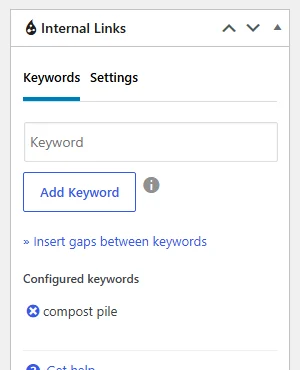
Settings that matter. By default each target gets one link per page, and there is no limit on links per post, so set one. You can block words and posts, skip headings and bold text, and use gap keywords so “best plugin for SEO” also matches “best SEO plugin”. It does not suggest anything. If you never type keywords for a post, it never gets links.
Free vs Pro. Free links posts and pages. Pro adds linking on category and tag pages and in custom fields, links to any URL (useful for affiliate links), keyword import from Yoast or Rank Math, a per-paragraph link limit, a cap on incoming links and respect for links you already added by hand.
Price. $69.99 a year for 1 site, $149.99 for 5, $189.99 for 10. Its pricing page says you can ask for a refund within 14 days of buying. Read the full refund terms before you pay.
Watch out for. Short, common keywords lead to far too many links. Some users report slow saves on large sites and an index stuck at zero when WordPress’s background task runner fails.
Best for: large sites that want hands-off in-text links and will spend time setting keywords for each important post.
3. Yoast SEO Premium
Yoast SEO is on more than 10 million sites, but its free version only counts links. You get columns in the posts list showing how many internal links each post has and receives.
How Premium works. As you write, Yoast’s internal linking tool picks the 20 most prominent words in your post and compares them with every other post. It lists the closest matches in a sidebar, with your cornerstone posts first. You drag a suggestion into the text or copy the link. It also adds an orphaned content filter, which shows posts with no links pointing to them, and four linking blocks: subpages, sibling pages, related links and a table of contents.
What it does not do. It never adds links on its own. There is no auto-linking, no bulk editing and no link audit. Links inside some page builders, like Elementor, are not counted.
Price. $118.80 a year per site, before VAT.
Best for: sites already paying for Yoast Premium who want link ideas while they write.
4. Rank Math
Rank Math has 4 million+ installs and gives you more linking tools for free than Yoast or AIOSEO.
Free. It counts internal and external links for every post and shows them in the posts list. It also shows link suggestions in the editor. These are simpler than they sound. In the code, the free suggestions are up to five posts you have marked as Pillar Content that share a category or tag with the post you are editing. If you have not marked any Pillar posts, you get none.
Pro. Rank Math Pro adds Link Genius: a link audit that finds broken, redirected and nofollow links, bulk find-and-replace with rollback, and auto-linking from a keyword map, with a default of three links per post. Its AI link suggestions also need Rank Math AI, which used to be called Content AI. Its plans start at €5.99 a month, billed yearly, for 50 AI-assisted link suggestions.
Price. Pro is €7.99 a month billed yearly, before VAT, for unlimited personal sites.
Watch out for. The link counter stores a marker on every post. On large sites, users have reported this taking up a big share of the post meta table.
Best for: Rank Math users who want link counts free, and the fullest set of linking tools for the price.
5. All in One SEO
All in One SEO keeps its Link Assistant out of the free plugin. The free version only warns you when a post has too few internal links.
How Link Assistant works. It scans your site in the background, then suggests phrases in each post that could link to other posts, and links you could add to a post from elsewhere. It reports orphaned posts, the outside domains you link to, and affiliate links. You can add suggested links in bulk. Even with “automate” on the sales page, the FAQ says it does not add links by itself. You still click to accept each one.
Price. Pro is the cheapest plan that includes it: $199.50 for the first year, then $399, for 10 sites. There is no single-site plan with Link Assistant.
Watch out for. It only works in the block editor, and AIOSEO says it works best in English.
Best for: agencies already on AIOSEO Pro.
6. Inline Related Posts
Inline Related Posts is the best known inline boxes plugin, with 100,000+ installs and a 4.3 out of 5 rating.
How it works. It is off after you install it. Once you switch it on, it adds up to three “See also” boxes inside each post, at least 250 words apart. It avoids splitting headings, lists, tables and images. On our test post it added three boxes. Each box links to one post, picked at random from posts in the same category or tag. The first box on our crime story linked to an unrelated celebrity biography, because both sat in the same category. The pick changes on every page view, since nothing is stored.
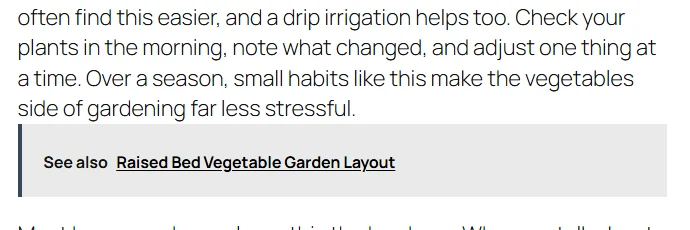
Watch out for. The boxes open in a new tab by default and print their own styling code each time. On our test site, with several other plugins also changing post content, the boxes did not show until we turned those other plugins’ filters off. Test it on your own theme. The free version shows one post per box with no image. The premium version’s sales page was still offline when we checked again on November 12, 2026.
Best for: long articles on sites with tight categories, where any post in the category is a fair pick.
7. Ariadne Related Posts
Ariadne Related Posts is our plugin. It is a related posts plugin, so it does not add links inside your sentences.
How it works. For each post, Ariadne scores the others by shared tags, shared categories, shared title words and how similar the full text is. You can change how much each signal counts. It works the list out in the background when you save, and stores it with the post. On our test post, reading the stored list took 3 milliseconds, so it adds almost nothing to page load. Each post’s edit screen shows its list and the score behind each match.
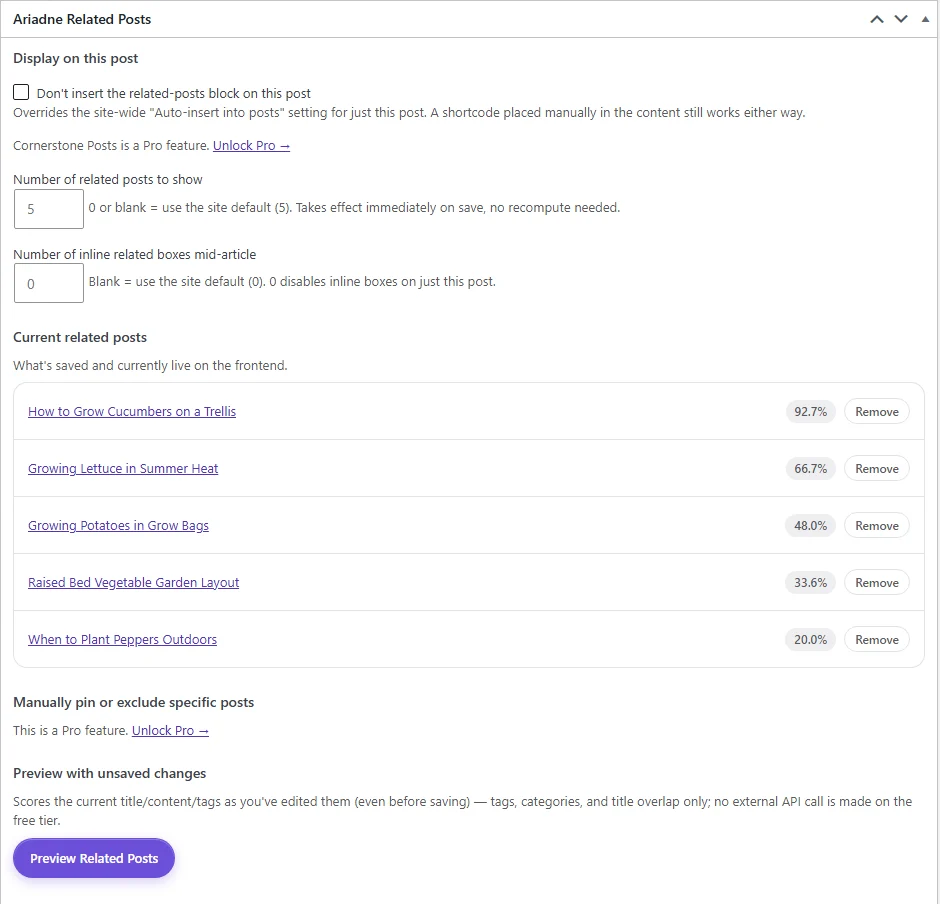
Where links appear. Under the article, or anywhere you place its block, shortcode or widget. It can also show an “Up next” link to the best match as a reader nears the end. Turn these on in Settings after you install it. The Pro+ plan adds up to three inline boxes inside long articles, placed between paragraphs and never right after a heading.

Free vs paid. Free includes the matching, the background jobs, all placements except inline boxes, and Up next. It needs no API key and sends nothing anywhere. Pro adds AI matching with your own Voyage AI key, pinning and excluding posts, related products for WooCommerce, full styling and more looks for the lists, choosing the exact paragraph, a Popular posts list and stats on how often readers click your lists. Pro+ adds the inline boxes and WP-CLI.
Price. Pro is $49.99 a year or $4.99 a month. Pro+ is $99.99 a year or $9.99 a month.
Watch out for. It is new on WordPress.org, with few installs and no reviews yet. Its picks are only as good as your tags and categories. On our test post, which had no close match on the site, half of its picks were related crime and survival stories and half were loose matches.
Best for: sites that publish often and want every post linked to relevant ones without manual work. Pair it with one of the in-text tools above.
What happens if you switch plugins later
Before you pick an internal linking plugin, think about what happens if you stop using it. The plugins handle this in very different ways, and it matters most for automatic linking.
Link Whisper writes its links into your posts, so they stay after you remove it. That is good if the links were well chosen, but any weak link it added stays too, until you find it and edit it out. Internal Link Juicer works the other way. Its links are added as the page loads, so deactivating it removes every link it made, all at once. A site that leaned on it for hundreds of links loses them overnight, which is worth knowing before you build your linking around it. Inline Related Posts and Ariadne add their boxes and lists the same way, but those sit outside your sentences, so removing them leaves your writing as it was.
The plugins also differ in what they leave in your database. We removed the three free plugins the normal way, from the Plugins screen, then checked. Link Whisper left 27 tables, and between it and Internal Link Juicer, 19,301 rows of saved post data stayed behind. Inline Related Posts left only a few settings. Ariadne deletes its settings and saved data when you delete it, unless you tick the option to keep them for a later reinstall.
Which one should you pick?
The best WordPress plugin for internal linking depends on how you write and how many posts you have. Start with what you already have. Rank Math counts links for free, and Yoast or AIOSEO users may already have link suggestions on a paid plan. Use them for a few weeks before buying anything.
If you write and link by hand, a suggestion tool saves time. Link Whisper’s free version is a good start, but check each suggestion. If you have hundreds of posts and want links without editing them, Internal Link Juicer can link keywords for you. Keep the keywords specific, set a per-post limit, and read a sample of posts after the first index build.
Add a related posts plugin if your older posts get few links, or if you publish often and cannot go back to update old articles. Ariadne is the one we built for this. Its free version scores every post against the others, keeps the lists fresh in the background, and adds an “Up next” link, with no API key and almost no extra load on your pages. Ariadne Pro adds a Popular posts list for each category and shows which of your lists readers click. If you want boxes inside the article too, Ariadne Pro+ places them by relevance, where Inline Related Posts picks at random. It also works next to any of the in-text tools above. They handle links inside your writing, and Ariadne keeps every post, old or new, linked to its closest matches.
If you want an AI internal linking tool, three of these offer one. Link Whisper’s free version gives you 250 AI credits when you sign up. After that, its AI suggestions use credits that come with Premium, or your own OpenAI key. Rank Math’s AI link suggestions need a paid Rank Math AI plan. Ariadne Pro uses AI to match related posts, with your own Voyage AI key, and sends each post once, only when its content changes. AI matching is better at spotting posts on the same topic that use different words, but you pay as you go, and you do not need it to start. Whichever internal linking tool you pick for SEO, the links only help if they make sense to a reader.
A simple setup for most blogs: Rank Math or Yoast for link counts, Link Whisper free for suggestions while you write, and Ariadne for related posts. For more on how each kind of link affects search, see related posts and internal linking: what actually moves SEO.